
 23 MIN READ
 UPDATED OCT 30, 2026
⚠️ Contractor invoice and payment deadlines: late action means late payment
- Contractors: submit invoices by the 19th of each month. A saved draft is not a submitted invoice.
- Admins: approve invoices by the 21st of each month. Submission alone does not authorize payment.
- Funding: Toku must receive cleared funds 4 - 5 business days before payout. Initiating a transfer or sending proof of payment does not meet the deadline.
- Standard monthly payout: the last day of the month, provided submission, approval, and funding deadlines are met. Late submission, approval, or funding will delay payment. Every day of delay pushes payment back by at least one day. A missed payment cycle can cause a longer delay; the invoice due date is not a guarantee of payment.
Automation does not remove these deadlines. Earlier published holiday deadlines take precedence; see Toku: 2026 End-of-Year Payroll & Payment Guide.
📘 For Toku organization administrators | Last reviewed September 1, 2026 Use this playbook to run EOR, PEO, and payroll-only employee operations and contractor operations confidently from onboarding through monthly payroll, invoicing, time off, expenses, changes, and support.
Welcome to Toku. We handle the employment, payroll, benefits, and compliance infrastructure behind your global team. You remain responsible for day-to-day management and for giving Toku complete, timely instructions through the platform.
Platform
Click to Open and Log into Toku
Deadlines
Toku: 2026 and 2027 Payroll Calendar and Deadlines
Hiring guides
Support
Toku: Contact our Team for Support!
📅 Employee pre-funding deadlines: submit by the 10th, fund by the 14th. For EOR, PEO, and payroll-only employees, any change requiring pre-funding, including large bonuses and severance, must be submitted with payment details by the 10th. Toku invoices on the 11th or next business day. Full funds must be received and cleared by the 14th for that month's payroll consideration. The termination finalization deadline of the 20th does not extend these dates. Earlier payroll cutoffs still apply.
Your month at a glance
These are the standard operating dates. Country holidays and organization-specific schedules can move a deadline earlier, so use the Toku: 2026 and 2027 Payroll Calendar and Deadlines as the source of truth for each cycle.
| When | Employees: EOR, PEO, and payroll-only | Contractors | Your admin action |
|---|---|---|---|
| 1st - 9th | Review new hires, compensation changes, bonuses, leave, expenses, and terminations that may affect payroll. | Monthly auto-generated invoices appear on the 1st only for contractors whose Auto-generate and Auto-submit settings were enabled by an admin. | Enter changes early and review your approval queues. Do not wait for the cutoff day. |
| 7 calendar days before each semi-monthly payday | Standard cutoff for payrolls paid on the 15th and last business day. The exact dated cutoff is shown in the payroll calendar. | Not applicable. | Submit every payroll-impacting change in Toku by the dated cutoff. |
| 10th | Standard monthly payroll cutoff for most countries. | Not applicable. | Confirm salary, bonus, bank, leave, and other payroll-impacting changes are complete in the platform. |
| 11th or next business day | Toku sends employee pre-funding invoices for eligible changes submitted by the 10th. | Not applicable. | Review the invoice and arrange payment immediately. |
| 14th | Full required employee pre-funding must be received and cleared. | Not applicable. | Ensure funds have reached Toku, not just been sent. |
| 19th | Not applicable. | Contractor invoices and reimbursement invoices are due. | Check that every expected invoice has been submitted (it shows under Pending Review on the Invoices page). |
| 20th | Final termination details due for monthly payroll consideration. This does not extend the 10th submission or 14th funding deadline. | Not applicable. | Confirm dates, PTO, severance, garden leave, and payment terms are final. |
| 21st | Not applicable. | Contractor invoice approval deadline. | Approve or reject every submitted invoice. Toku can prepare the consolidated funding invoice only after your review is complete. |
| Immediately after the consolidated invoice arrives | For required employee pre-funding, ensure full funds clear by the 14th; earlier cycle requirements still apply. | Fund the consolidated invoice, including contractor payments and Toku fees. | For contractors, ensure cleared funds reach Toku 4 - 5 business days before the last-day-of-month payout. For required employee pre-funding, funds must clear by the 14th. |
| Month-end | Standard payday for monthly employee payroll countries is the last business day, subject to published holiday schedules. | Standard contractor payout is the last day of the month, subject to timely submission, approval, and funding and published holiday schedules. | Confirm funding and approvals are complete before the payment window. |
The easiest way to stay ahead: use the first week of each month for payroll changes, the third week for contractor approvals, and fund as soon as Toku sends the consolidated invoice. Monthly contractor costs are often consistent, so your finance team can forecast the expected amount before the invoice arrives.
What happens when a deadline is missed?
- A payroll change submitted after its cutoff is generally handled in the next available regular payroll cycle. An employee additional payment requiring pre-funding also moves to the next eligible regular cycle if full funds clear after the 14th, even if it was submitted by the 10th. Statutory final-pay obligations continue to be handled according to local law.
- A contractor invoice that is not submitted by the 19th or approved by the 21st will delay payment for each day of delay. Missing a payment cycle can cause a longer delay.
- Toku can release contractor payments only after cleared funds are received. Funding sent close to payday does not leave enough time for banking and payment processing, so the payment date will move.
- Incomplete employee onboarding can delay the employment start date, country registration, benefits enrollment, or first payroll. The sooner you flag an issue, the more options the team may have. Additional or off-cycle processing may not be available in every country and may carry a fee.
Billing, deposits, and funding
Your signed agreement controls. Your Professional Services Agreement and applicable Order Form are the source of truth for Toku service fees, pricing, deposits, invoice recipients, payment terms, and any client-specific billing arrangement. This section explains Toku's standard operating process.
How the billing cycles differ
| EOR and PEO employees | Contractors | |
|---|---|---|
| Billing model | Generally billed in arrears under Toku's standard operating cadence. Required pre-funding for additional employee payments and termination costs is collected in advance. | Prefunded before Toku releases contractor payments. |
| When to expect the invoice | Usually during the first week of the month, reflecting employee costs and fees from the prior month. If your signed agreement specifies advance billing or another cadence, those terms control. | After contractor invoices have been submitted and your admins have completed approvals. Toku consolidates the approved amounts and applicable Toku fees into one invoice. |
| When payment is needed | By the invoice due date for regular billing. Required employee pre-funding must be received and cleared by the 14th for that month's payroll consideration. | Before the contractor pay date. Send funds immediately after receipt so cleared funds reach Toku before the funding deadline. |
| Why the timing matters | Toku has already incurred or paid employment-related costs for the prior billing period. | Toku cannot remit money it has not received. Late funding moves the contractor payment date. |
Employee pre-funding deadlines
These requirements apply to EOR, PEO, and payroll-only employee payrolls. Contractor invoice and funding deadlines are separate.
- Submit by the 10th: Enter complete payroll changes and the payment details needed for invoicing in Toku by the 10th of the month for consideration in that month's payroll.
- Invoice on the 11th or next business day: Toku reviews changes submitted by the 10th and sends admins the required pre-funding invoices on the 11th, or the next business day.
- Funds received by the 14th: Toku must receive and clear the full required pre-funding by the 14th of the month. Initiating a transfer or sending proof of payment is not sufficient. Allow time for banking and clearance.
- Both deadlines must be met: An on-time submission alone does not secure the payroll cycle. If required funding clears after the 14th, the additional payment moves to the next eligible regular payroll cycle. An off-cycle request requires separate confirmation and may carry fees. These dates apply whenever employee pre-funding is required, including bonuses, other additional compensation, and termination or severance payments. Additional employee payments over $5,000 USD require pre-funding. The platform's documented review hold starts at $5,000 USD or more; a hold is not confirmation of funding or payroll inclusion. Toku Billing confirms the funding requirement for a held entry.
For semi-monthly payrolls or earlier paydays, the applicable earlier payroll and processing cutoffs still apply. The 10th/14th deadlines do not guarantee a mid-month payment or extend an earlier cutoff. Plan transfers around weekends and holidays so funds clear by the 14th.
What your invoice may include
Your Order Form identifies the Toku administrative or service fees that apply to your organization. In addition, expect Toku to invoice or reconcile costs it pays or incurs on your behalf for employees and contractors.
| Charge type | Examples |
|---|---|
| Toku service fees | The recurring employee, contractor, payroll, PEO, EOR, TGA, or other administrative fees listed in your Order Form. |
| Employee onboarding fee | The standard Order includes a one-time onboarding fee equal to one month of the applicable worker-management fee for each EOR or PEO employee. |
| Compensation and worker payments | Gross wages, approved contractor invoices, bonuses, commissions, allowances, paid leave, and other agreed compensation. |
| Employer and statutory costs | Employer taxes, social contributions, tax withholding obligations, employment insurance, and other costs required by local law. |
| Benefits and approved expenses | Medical or other insurance premiums, pension or retirement costs, employee expenses, and contractor reimbursement invoices. |
| Employment changes and termination costs | Salary adjustments, payment in lieu of notice, accrued leave, mandatory or approved severance, and related fees or expenses. |
| Additional services and transaction costs | Visa or immigration support, local counsel, special tax services, applicable taxes, currency conversion, blockchain gas fees, or other client-elected services when applicable. |
A useful rule of thumb: if Toku pays or incurs an approved cost because of an employee or contractor, expect that amount to be billed or reconciled back to your organization unless your signed documents say otherwise.
EOR and PEO refundable deposits
Toku generally requires a refundable deposit equal to 1.5 months of each EOR or PEO employee's gross salary, subject to the applicable Order Form.
- The deposit is collected before Toku begins providing services for that employee.
- It is security against employment and payroll obligations Toku may have to meet before client payment is received. It is not a monthly Toku service fee.
- Adding a new employee may trigger a new deposit invoice. Material compensation changes or other increased exposure may require a deposit adjustment.
- The 60-day return period does not begin when a termination is requested or when a mutual termination agreement is signed. It begins only after the termination is fully complete: the employee has reached their final employment date, all final payroll and termination-related payments have been issued and finalized, and the client has paid all related invoices.
Example: If a mutual termination agreement includes a two-month notice, continued-employment, garden-leave, or negotiated separation period, the deposit-return clock does not start on the agreement date. It starts after that two-month period has ended, the employee's final payment has been completed and reconciled, and all related client invoices have been settled. Toku will then begin the 60-day return period for the remaining refundable deposit.
How invoices are delivered
- Invoices are emailed from [email protected] to the Client Invoice Recipients or Contract Manager identified in your signed documents, unless your Contract Manager provides different written instructions.
- The email includes the invoice attachment, an itemized breakdown of charges, and payment instructions.
- Invoices identify the applicable Order and provide enough detail for your team to review the calculation. Reasonable supporting documentation for mandatory costs can be requested.
- Review invoices promptly. If something appears incorrect, contact [email protected] before the due date and include the invoice number, organization name, and disputed line item.
Keep your finance contacts current. If the people named in your PSA or Order Form are not the people who process invoices, ask your Contract Manager to update the invoice-recipient instructions in writing. A missed internal handoff does not change the invoice due date or contractor funding deadline.
EOR employee or contractor: why the distinction matters
Toku uses contributor as an umbrella term for people in the platform. It does not mean employees and contractors are managed the same way.
| EOR employee | Contractor | |
|---|---|---|
| Legal relationship | Employed by Toku's local WorkCo entity and assigned to work for your organization. | Provides services under a consulting agreement. The contracting party depends on the selected contractor model. |
| How they are paid | Through payroll, with statutory deductions and a payslip. | Against a submitted and approved invoice. |
| Standard timing | Monthly or semi-monthly based on the country and organization schedule. | Invoice submitted by the 19th, admin approval by the 21st, cleared funds received 4 - 5 business days before the last-day-of-month payout. |
| Time off | Receives statutory and contractual leave administered through Toku. | Does not accrue or request employee PTO. Optional availability tracking must not be administered like employee paid leave. |
| Expenses | Uses the employee Expenses workflow. | Adds approved business costs to a contractor invoice as a reimbursement. Contractors should not use the employee expense workflow. |
| Benefits | Receives applicable statutory and contractual benefits. | Does not receive employee benefits unless a legally reviewed arrangement expressly provides otherwise. |
| Ending the relationship | Requires Toku review and a locally compliant employment process before anything is communicated as final. | Follows the applicable consulting agreement, notice terms, and contractor workflow. |
⚖️ Protect the contractor classification. Contractors should be managed around services, deliverables, and availability, not employee-style hours, paid leave, benefits, or expense policies. If the working relationship begins to look like employment, contact [email protected] before adding employee-style controls.
How the EOR partnership works
| Toku / WorkCo handles | Your organization handles | We coordinate together |
|---|---|---|
| Local employment agreements and required employment documents | Day-to-day work direction, role expectations, workload, and performance management | Complete, accurate onboarding information and supporting documents |
| Payroll calculations, statutory deductions, filings, and payslips | Business decisions about hiring, compensation, bonuses, performance, and termination | Country-specific changes that need legal, payroll, benefits, or immigration review |
| Statutory and contracted benefits administration | Submitting formal instructions in Toku by the applicable deadline | Clear communication to the employee after Toku confirms the compliant process |
| Local employment compliance and required employer actions | Approving payroll, time off, employee expenses, and contractor invoices | Early escalation when a deadline, start date, payment, or employee relationship is at risk |
| Contributor support for payroll, benefits, employment, immigration, and the platform | Timely prefunding and the costs associated with client-directed employment decisions under your agreement | Maintaining correct admin permissions and points of contact |
The platform is the system of record. A Slack message, direct message, or email does not replace a formal submission in Toku. If a change is not entered and approved in the platform by the applicable cutoff, Toku may be unable to include it in that cycle.
Set up your admin team for success
- [ ] Name an internal owner for People / HR, payroll approvals, contractor invoices, and finance / funding.
- [ ] Add only the administrators who need access and review their permissions. Toku: How to Add a New Organization Administrator.
- [ ] Save the Toku: 2026 and 2027 Payroll Calendar and Deadlines and schedule internal reminders before each cutoff.
- [ ] Review the Toku: Country Hiring Guides and Country Readiness for Hiring tracker before confirming a country or proposed start date.
- [ ] After each contractor is onboarded, go to Company → Settings and configure Auto-generate and Auto-submit for that individual. These settings are not enabled automatically. If you want eligible invoices approved automatically, also enable the separate organization-wide Auto-Approval setting and add per-currency thresholds. Toku: Set up auto-invoicing for your contractors
- [ ] Keep your Toku Slack channel limited to client administrators.
- [ ] Tell contributors which support email to use so their request reaches the correct queue.
Onboarding, changes, and terminations
Onboard early
Initiate onboarding at least two weeks before the intended start date. Full-time employee start dates must ordinarily be at least five days out in the platform, but country registrations, benefits, immigration, and document requirements may require more time.
🌍 Check the country before confirming a start date. Read the Toku: Country Hiring Guides for employer costs, employment terms, leave, benefits, and termination requirements. Then review the Country Readiness for Hiring tracker for Toku's onboarding requirements, employment-agreement readiness, and the timeline needed before hiring in that country. Review both resources before committing to a start date.
- Add the person in People and select the correct employment and engagement model.
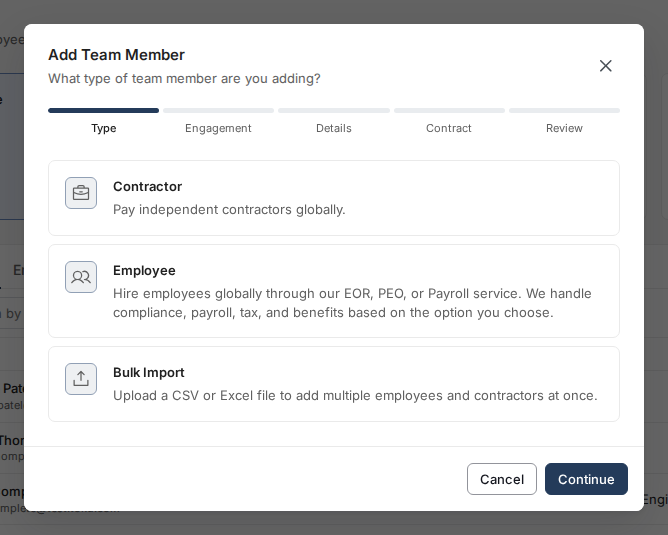
- Provide accurate role, compensation, country, start date, and job description information.
- Monitor the Onboarding tracker and follow up on incomplete contributor tasks.
- Wait for Toku to confirm the employment agreement, required registrations, and approved start date. Toku: Add a single contributor | Toku: Onboard Contributors as a Client Admin in Toku
Submit employment and payroll changes in Toku
Use the platform for salary changes, bonuses, banking changes, time off, employment details, and any other item that affects payroll.
- For most monthly payroll countries, submit by the 10th.
- For semi-monthly payrolls paid on the 15th and last business day, use the exact dated cutoff in the payroll calendar.
- Do not promise a final effective date, amount, or document to an employee until Toku confirms the legal and payroll treatment. Toku: How to Submit Salary and Employment Changes | Toku: Compensation changes - timing, approvals, and what employees see
Bring Toku into terminations before communicating a final outcome
EOR terminations can require notice, consultation, severance, government filings, benefits steps, or locally prescribed documents. Submit the request in Toku as soon as the decision is being considered and before presenting final dates or terms to the employee.
Your organization owns the underlying business decision. Toku confirms the compliant process, required documents, timing, and estimated costs before execution.
Employee termination deadlines
- Submit the request in Toku at least 14 calendar days before the proposed termination date. Longer contractual, statutory, consultation, or payroll requirements still apply.
- For monthly payroll countries, submit payroll changes by the 10th and finalize all termination details no later than the 20th for consideration in that month's payroll. There are no exceptions to the 20th finalization deadline.
- When pre-funding is required, submit the change and payment details needed for invoicing by the 10th and ensure full funds are received and cleared by the 14th. The 20th finalization deadline does not extend either deadline. Plan large severance and other termination payments early enough to meet all three dates.
- A request is not finalized while the termination date, garden leave, PTO, severance, or payment terms remain under negotiation.
- The United States, Canada, the Philippines, and Brazil use semi-monthly cycles. Follow the applicable earlier cutoff in Toku: 2026 and 2027 Payroll Calendar and Deadlines. The 10th/14th funding requirements do not extend an earlier cycle deadline.
- Late changes or funding move discretionary additional payments to the next eligible regular payroll cycle. An off-cycle payroll requires Toku confirmation, starts at $49 USD per person, may cost more by country, and requires at least four business days of processing time.
- Statutory final-payment obligations continue to be handled according to local law; clients remain responsible for the associated costs. A missed funding deadline does not change those obligations. Toku: Initiate a termination as a client admin
Contractor operations
Monthly invoice and funding flow
- Invoice created: The contractor submits by the 19th, or Toku creates and submits it automatically when those settings are enabled.
- Admin review: Review the amount, period, services, and any reimbursement line items.
- Admin approval: Approve or reject every invoice by the 21st.
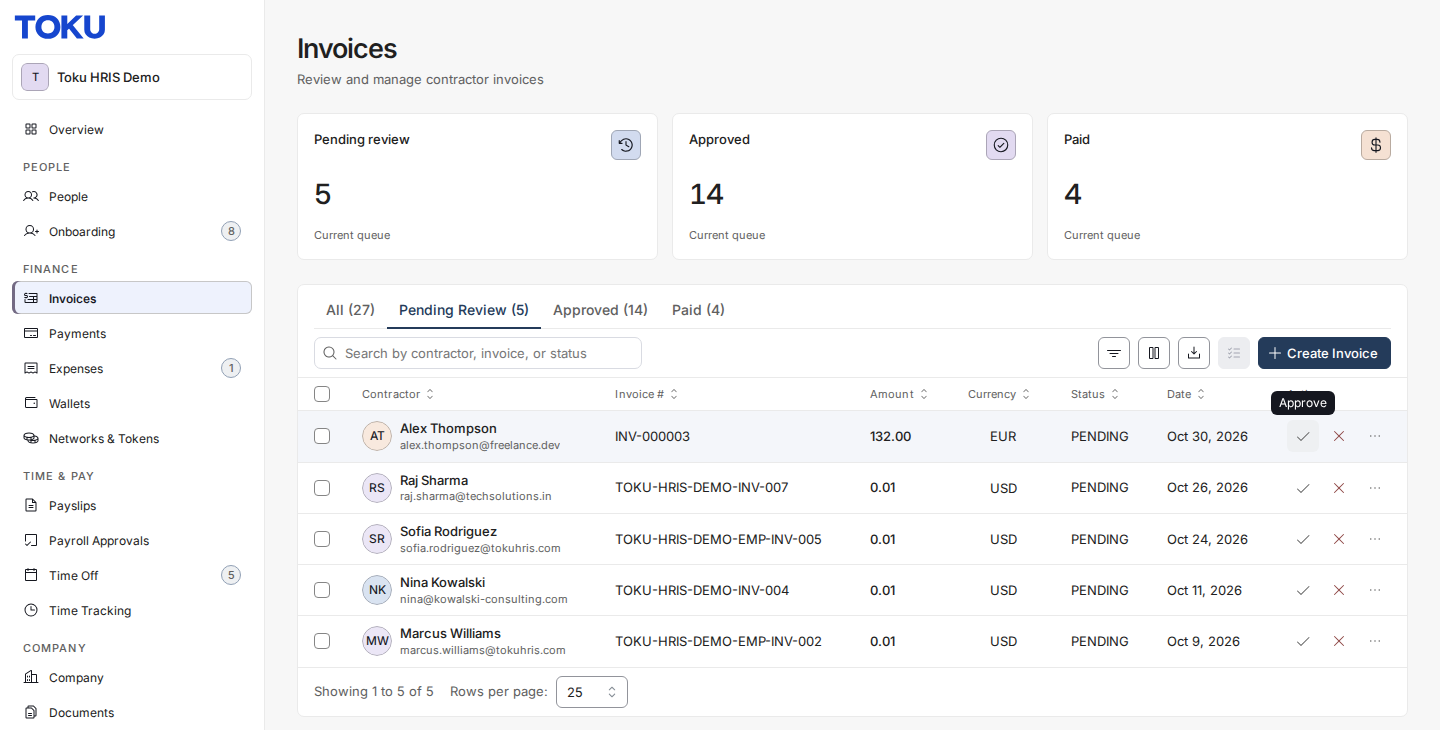
- Consolidated invoice: Once reviews are complete, Toku emails one invoice covering approved contractor amounts and applicable Toku fees.
- Prefunding: Fund immediately. Toku must receive cleared funds 4 - 5 business days before payout.
- Payment: Standard monthly contractor payout is the last day of the month when submission, approval, and funding deadlines are met. Earlier published holiday schedules take precedence. Toku: Invoice and payment cycle for contractors | Toku: Review, approve, and manage contractor invoices
Automation options
⚙️ Admin setup is required after every contractor onboarding. Invoice automation is not enabled automatically. Once the contractor is Onboarded, open Company → Settings. In Contractor Invoices, turn on Auto-generate, select the correct frequency, and turn on Auto-submit for that contractor. Repeat this setup for every new contractor. To automate approvals too, use the separate Invoice approvals card to enable Auto-Approval and set the appropriate per-currency thresholds. Toku: Set up auto-invoicing for your contractors
These are separate controls:
- Auto-generate: Toku creates an invoice from the contractor's contracted rate. This is configured per contractor.
- Auto-submit: The generated invoice moves directly into the admin approval queue instead of remaining a contractor-only draft. This is also configured per contractor.
- Auto-Approval: Submitted invoices at or below your per-currency threshold can be approved automatically. This is an organization-wide setting.
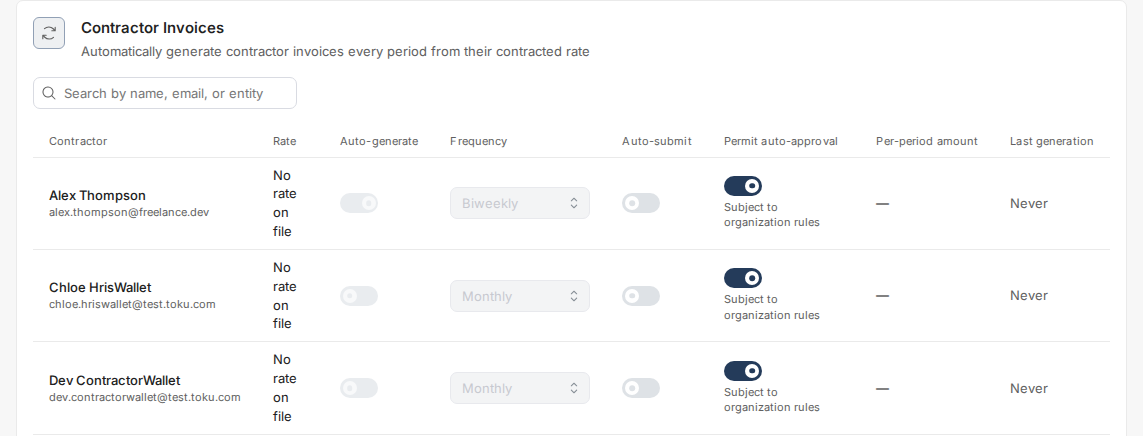
Use full automation for predictable recurring compensation. Keep manual review for variable hours, commissions, irregular scopes, or material reimbursements.
Contractor time off and reimbursements
- Contractors do not receive employee PTO. If you enable time-off functionality, use it only to track planned availability and review the classification risk with counsel. Avoid employee-style accruals, paid balances, or mandatory approval structures.
- Contractors do not submit through the employee Expenses tab. They should create a contractor invoice and select the reimbursement option so the item stays in the contractor invoicing workflow.
- Reimbursement invoice items follow the same 19th submission and 21st approval deadlines as other contractor charges. Toku: How to submit a reimbursement invoice
Employee time off and expenses
Time off
Employees submit leave through Toku. Your designated approver reviews the request in the platform, taking the employee's local statutory and contractual entitlement into account.
Toku: How to review and approve time off requests
Expenses
Employees use the Expenses workflow. The approval date determines the payment date:
| Approved | Paid |
|---|---|
| 1st - 15th | End of the same month |
| 16th - end of month | 15th of the following month |
| At termination | With final pay, subject to approval and local processing |
A valid receipt and business purpose are required. Keep contractor reimbursements in the contractor invoice workflow.
Toku: Expense reimbursement timeline and policy | Toku: Review and approve employee expenses
Slack and support
Your shared Slack channel is for client administrators coordinating with Toku on HR, payroll, finance, benefits, TGA, and operational questions. Do not add employees or contractors to the admin channel.
Contributors should email the responsible team directly. This protects personal information, creates a trackable case, and ensures requests are handled in the order received.
| Topic | Contact |
|---|---|
| Payroll, payslips, tax withholding, or tax forms | [email protected] |
| Client billing, invoices, funding, or expense and billing questions | [email protected] |
| Medical, pension, retirement, or other benefits | [email protected] |
| Employment legal or contract questions | [email protected] |
| Visas, work permits, or immigration | [email protected] |
| Token Grant Administration | [email protected] |
| Onboarding, terminations, HR, platform support, or anything else | [email protected] |
Use Slack for coordination, not as the system of record. Payroll changes, onboarding details, terminations, invoice approvals, expenses, and time off must still be submitted and approved in Toku.
Monthly admin checklist
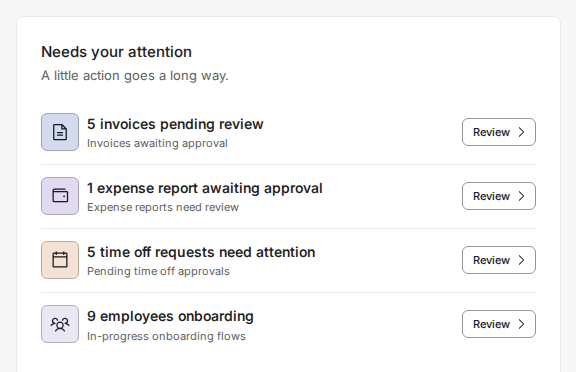
- [ ] Review onboarding progress and upcoming start dates.
- [ ] For every newly onboarded contractor, configure Auto-generate and Auto-submit and review your Auto-Approval thresholds under Company → Settings.
- [ ] Review EOR and PEO invoices issued during the first week, route them to finance, and pay by the stated due date.
- [ ] Submit monthly payroll changes by the 10th or the dated semi-monthly cutoff.
- [ ] Review employee time off and expense requests.
- [ ] Confirm contractor invoices are submitted by the 19th.
- [ ] Approve or reject contractor invoices by the 21st.
- [ ] Fund the consolidated invoice immediately so cleared funds reach Toku 4 - 5 business days before contractor payout.
- [ ] Check upcoming terminations, contract end dates, and immigration expirations.
- [ ] Escalate anything that may affect pay or employment status early.
Help Center toolkit
Admin and platform
-
Toku: 2026 and 2027 Payroll Calendar and Deadlines Country hiring
-
Country Readiness for Hiring tracker Employees
-
Toku: Initiate a termination as a client admin Contractors
-
Toku: How to submit a reimbursement invoice Need another answer?
Visit the Toku Help Center or email [email protected].