
 10 MIN READ
 UPDATED NOV 4, 2026
📘 For organization administrators on Toku. Last updated November 4, 2026.
Start the termination process for an employee or contractor by submitting a request in Toku for review and approval.
💡 Terminating a contractor? The form is shorter, but it uses the same reason rules: Resignation requires a resignation letter, and Poor performance requires both Reason Details and a performance improvement plan document. Contractors are not asked about garden leave, effective time, PTO, severance or PILON, or performance plans. If final amounts differ from the usual recurring invoice, ask the contractor to submit an invoice covering work through the last working day. The steps below show the fuller employee form.
Employee termination deadlines
- Submit the request in Toku at least 14 calendar days before the proposed termination date. Longer contractual, statutory, consultation, or payroll requirements still apply.
- For monthly payroll countries, submit payroll changes by the 10th and finalize all termination details no later than the 20th for consideration in that month's payroll. There are no exceptions to the 20th finalization deadline.
- When pre-funding is required, submit the change and payment details needed for invoicing by the 10th and ensure full funds are received and cleared by the 14th. The 20th finalization deadline does not extend either deadline. Plan large severance and other termination payments early enough to meet all three dates.
- A request is not finalized while the termination date, garden leave, PTO, severance, or payment terms remain under negotiation.
- The United States, Canada, the Philippines, and Brazil use semi-monthly cycles. Follow the applicable earlier cutoff in Toku: 2026 and 2027 Payroll Calendar and Deadlines. The 10th/14th funding requirements do not extend an earlier cycle deadline.
- Late changes or funding move discretionary additional payments to the next eligible regular payroll cycle. An off-cycle payroll requires Toku confirmation, starts at $49 USD per person, may cost more by country, and requires at least four business days of processing time.
- Statutory final-payment obligations continue to be handled according to local law; clients remain responsible for the associated costs. A missed funding deadline does not change those obligations. Employee pre-funding: For EOR, PEO, and payroll-only employees, additional payments over $5,000 USD require pre-funding. Whenever pre-funding is required, including termination or severance payments, submit complete changes and payment details in Toku by the 10th. Toku reviews those submissions and sends invoices on the 11th or next business day. Full funds must be received and cleared by the 14th for that month's payroll consideration. Funding received after the 14th moves the additional payment to the next eligible regular payroll cycle. Earlier cycle cutoffs still apply. Contractor deadlines are separate. See Additional Compensation Changes Over $5,000: Prefunding Approval.
Before you start
- You need administrator access to your organization account.
- Toku must review and approve the termination request before it takes effect.
- Gather the person's last working day and reason. Have a resignation letter ready for Resignation or a performance improvement plan document for Poor performance. For an employee, also gather year-to-date paid-time-off records and be prepared to acknowledge statutory-severance prefunding if the country requires it. For an involuntary termination, also know whether the employee has already been told about it and, if so, on what date.
Why Toku must be involved early
Toku must review and approve every termination request before it takes effect. The product uses the selected type, reason, dates, required documents, PTO, severance, and performance-plan details to route that review; this article explains the product workflow, not the legal requirements for a specific country or contract.
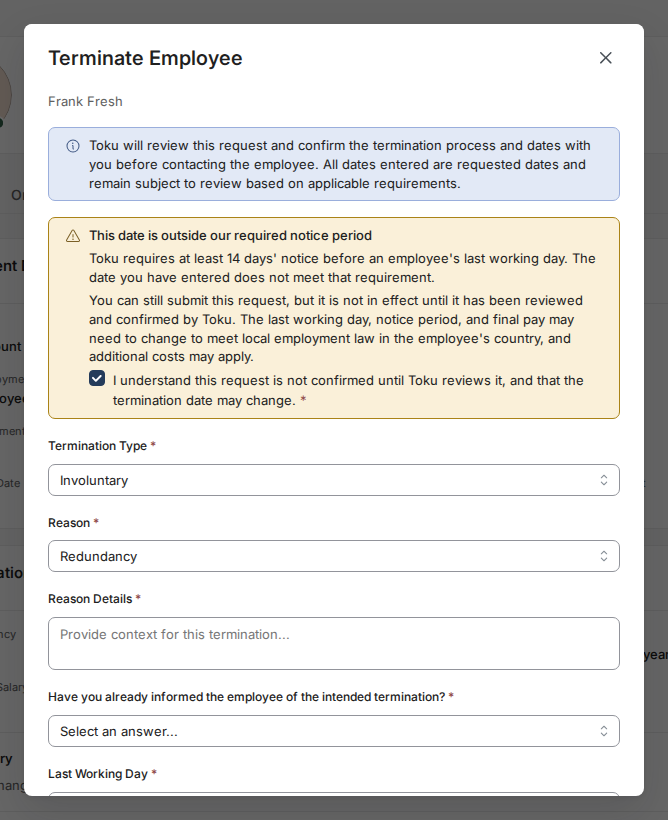
Submit the termination request for Toku review before treating the requested date as final. For an involuntary last working day less than 14 days away, the form requires an acknowledgement that the date is not confirmed until Toku reviews it and may change. This article describes the product workflow only and is not legal advice.
Find the person on the People page
- Log in to Toku at app.toku.com. Click People in the left-hand menu.
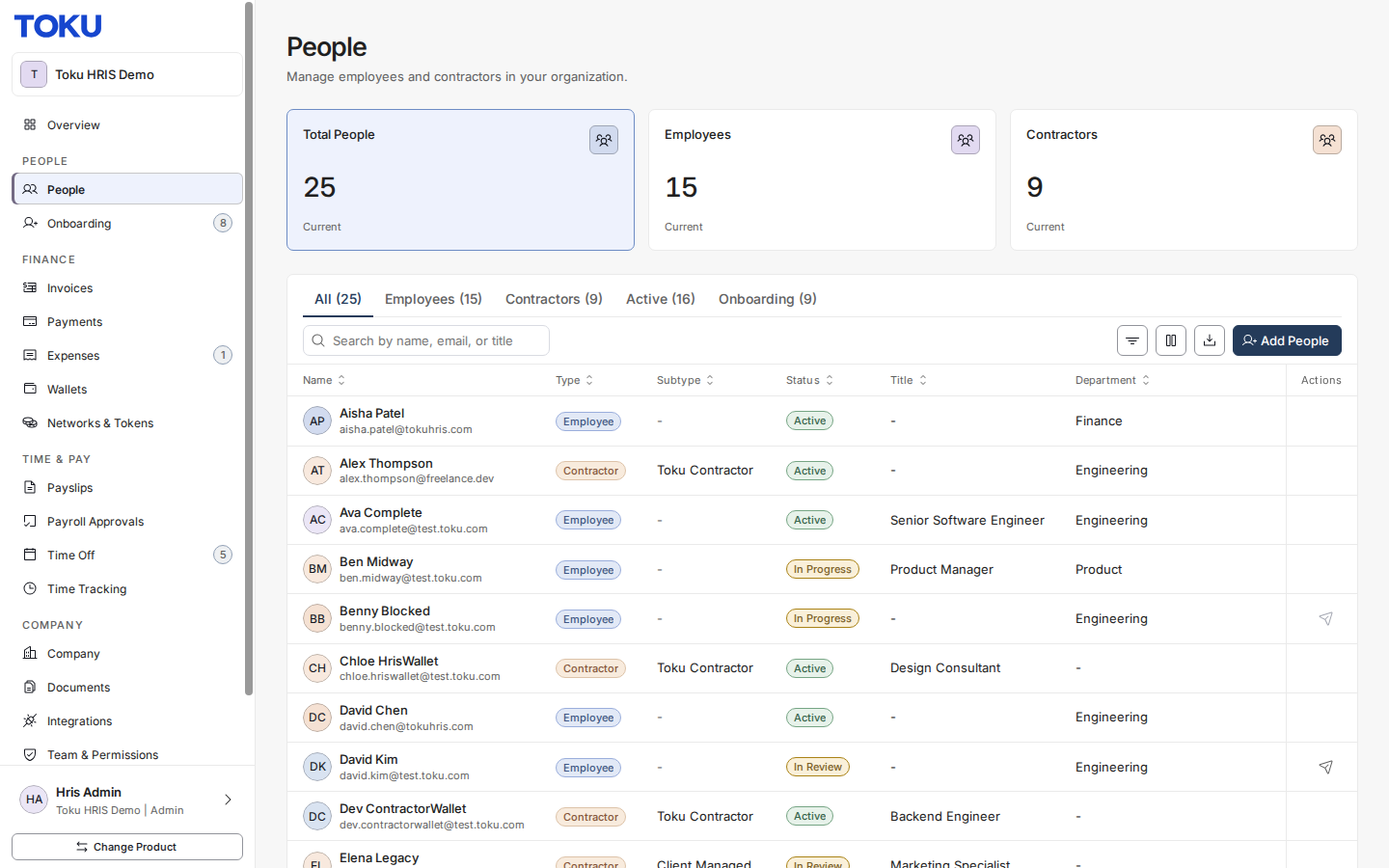
- Find the person by typing their name, email, or title in the search box. Click their row to open their profile.
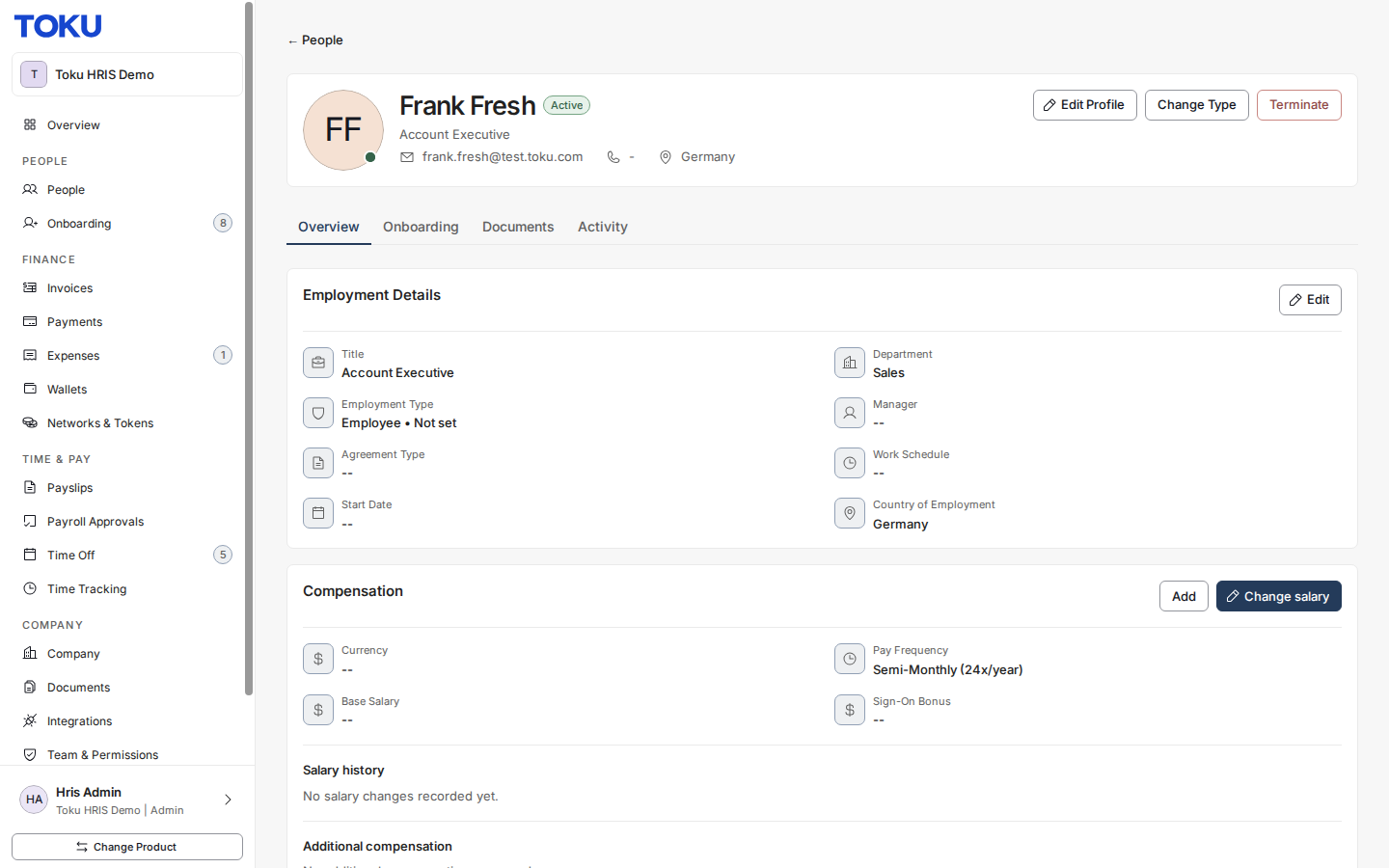
- On their profile, click the Terminate button. A window titled "Terminate Employee" opens. For a contractor, the window is titled "Terminate Contractor" and shows the shorter contractor form.
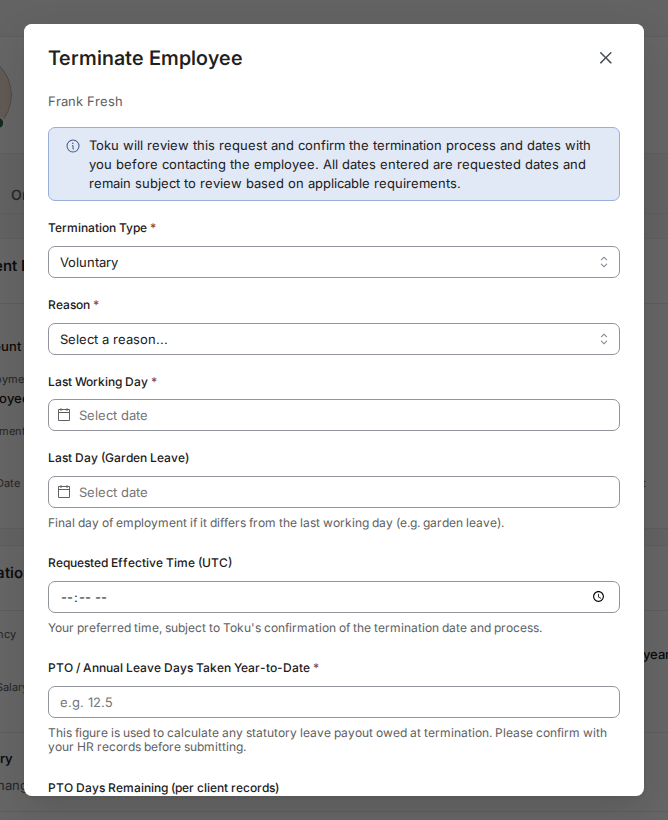
Select termination type
- Open the Termination Type menu and choose Voluntary (the person is leaving by choice) or Involuntary (your organization is ending the employment).
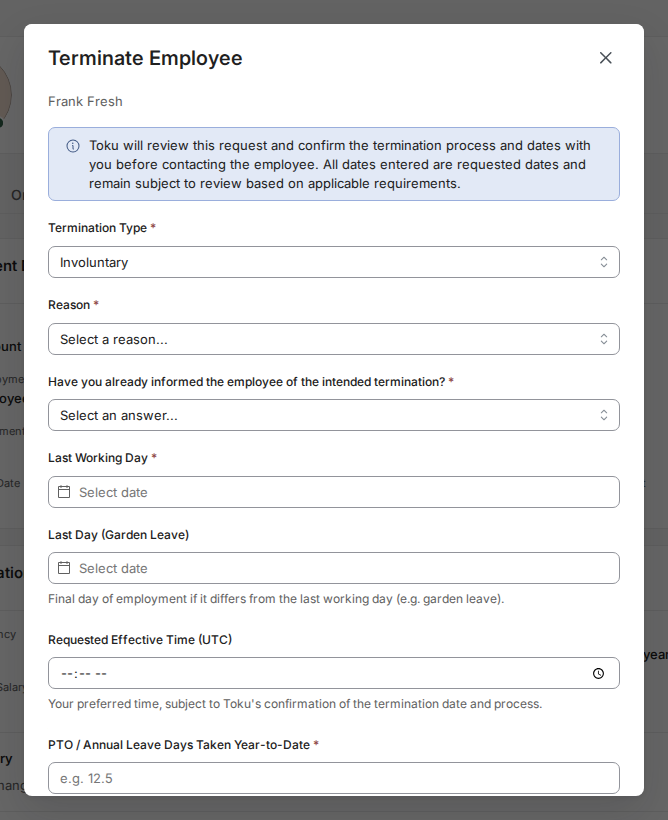
Fill in the reason and last working day
- Open Reason after choosing the type. Voluntary offers Resignation, Fixed-term contract expiry, or TUPE transfer. Involuntary offers Mutual agreement, Poor performance, Redundancy, Restructuring, Business closure, or Other. Reason Details is required for the five involuntary reasons other than Mutual agreement, optional for Mutual agreement, and not shown for the voluntary reasons. Resignation requires a resignation letter; Poor performance requires a performance improvement plan document.
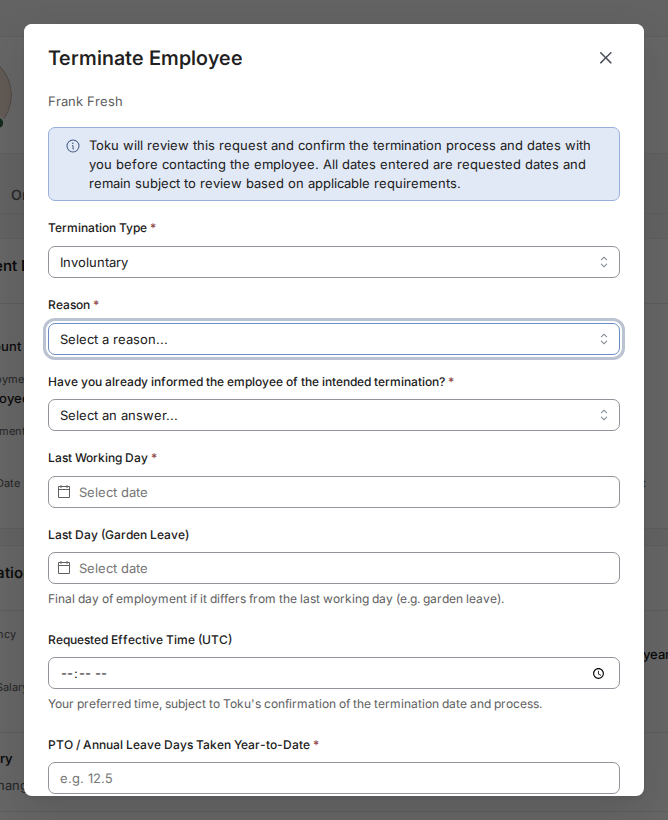
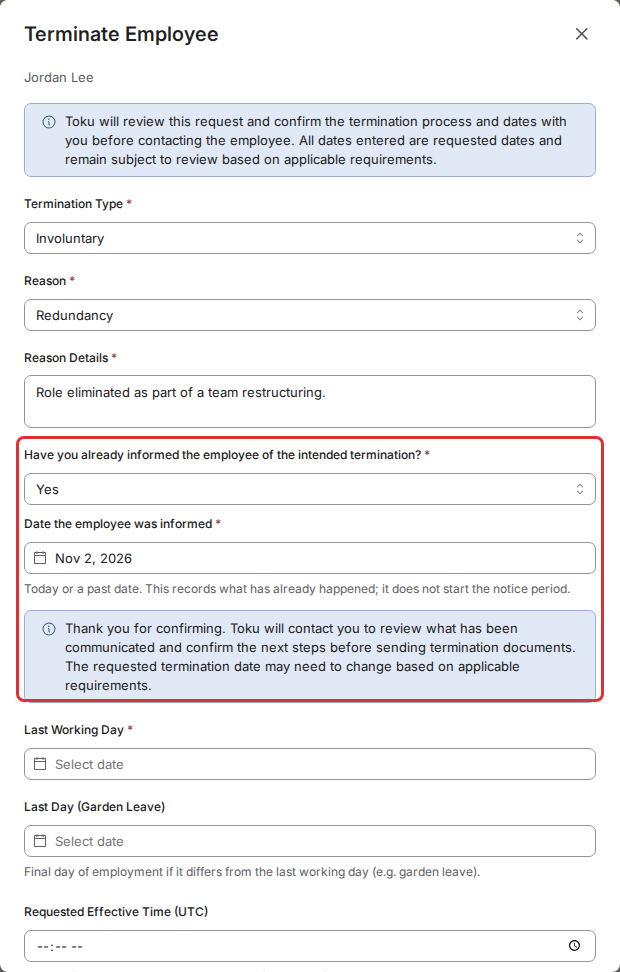
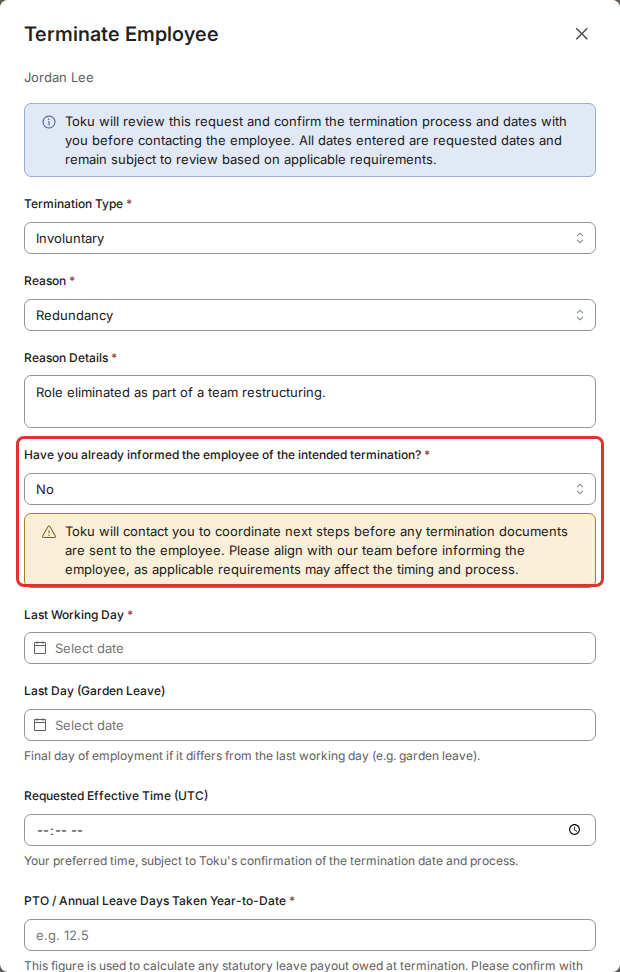
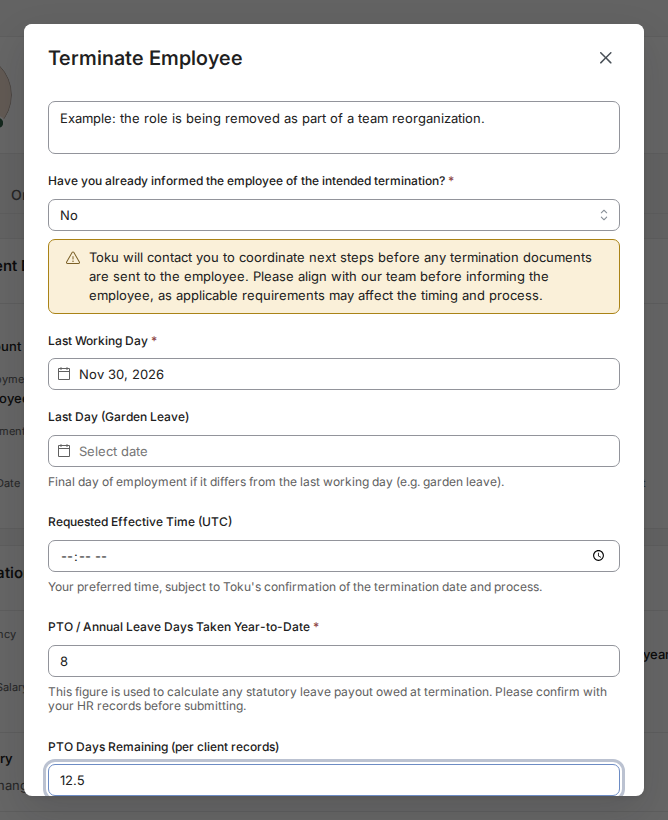
- For an involuntary termination, answer Have you already informed the employee of the intended termination? It appears right after Reason Details, and no answer is selected until you choose one. Choose Yes if the employee already knows, then pick the Date the employee was informed. Only today or an earlier date can be picked. A notice confirms that Toku will contact you to review what has been communicated and confirm the next steps before sending termination documents, and that the requested termination date may need to change. Choose No if the employee does not know yet. A notice explains that Toku will contact you to coordinate next steps before any termination documents are sent, and asks you to align with Toku before you tell the employee. Voluntary terminations do not show this question.
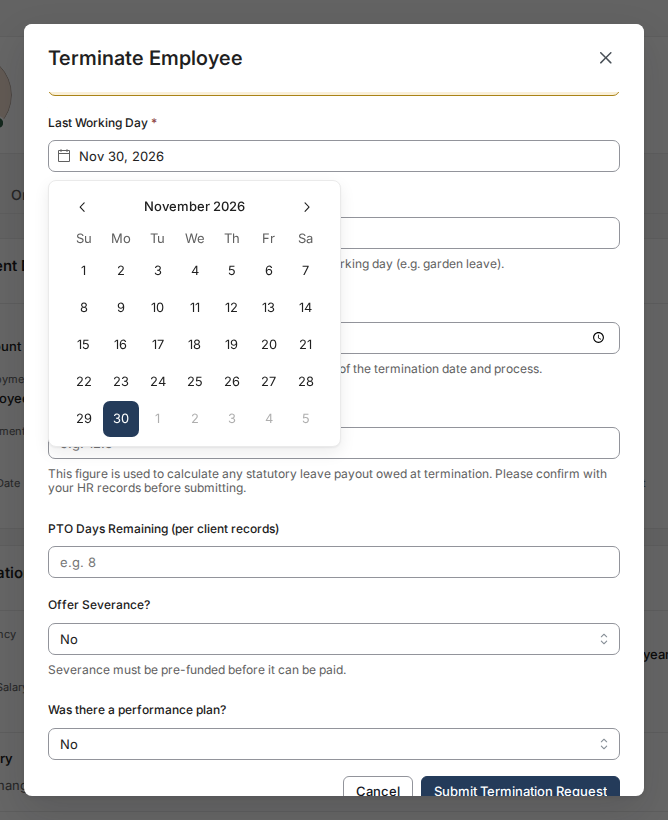
- Click the Last Working Day field and pick their final day of work in the calendar. Pay attention to any yellow notice about payroll timing - it warns that final pay might land in the following month. If the person is on garden leave, also set Last Day (Garden Leave) to their final day of employment if it differs from the last working day. Requested Effective Time (UTC) is optional - it's your preferred time on the last working day, subject to Toku's confirmation of the termination date and process. If the termination is involuntary and the last working day is less than 14 days away, a notice appears at the top of the form: This date is outside our required notice period. You can still submit the request, but you have to tick the box confirming it is not confirmed until Toku reviews it and that the date may change.
Enter paid-time-off details
- Fill in PTO / Annual Leave Days Taken Year-to-Date (the number of paid leave days already used this year) - this is required. Fill in PTO Days Remaining (per client records) (unused days left; half-days like 12.5 are allowed).
Review severance, PILON and statutory severance
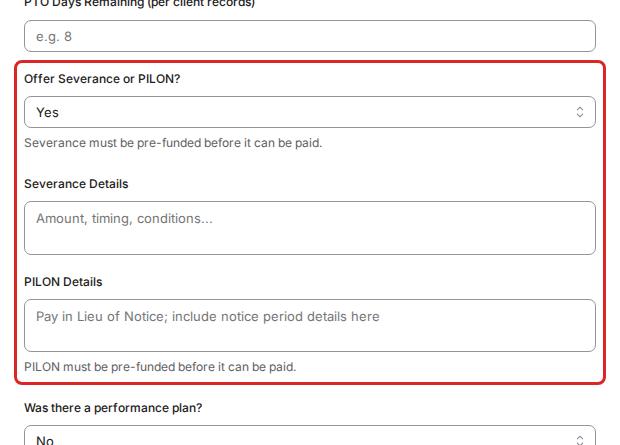
- Offer Severance or PILON? covers any additional discretionary severance and pay in lieu of notice (PILON). Choose Yes to show two boxes: Severance Details (amount, timing and conditions) and PILON Details (the pay in lieu of notice, including the notice period it covers). Severance and PILON must both be pre-funded before they can be paid. Separately, if statutory severance applies in the employee's country, a yellow warning appears whatever you answer, and you must tick the required acknowledgement that statutory severance will be prefunded before payment.
Answer the performance plan question and submit
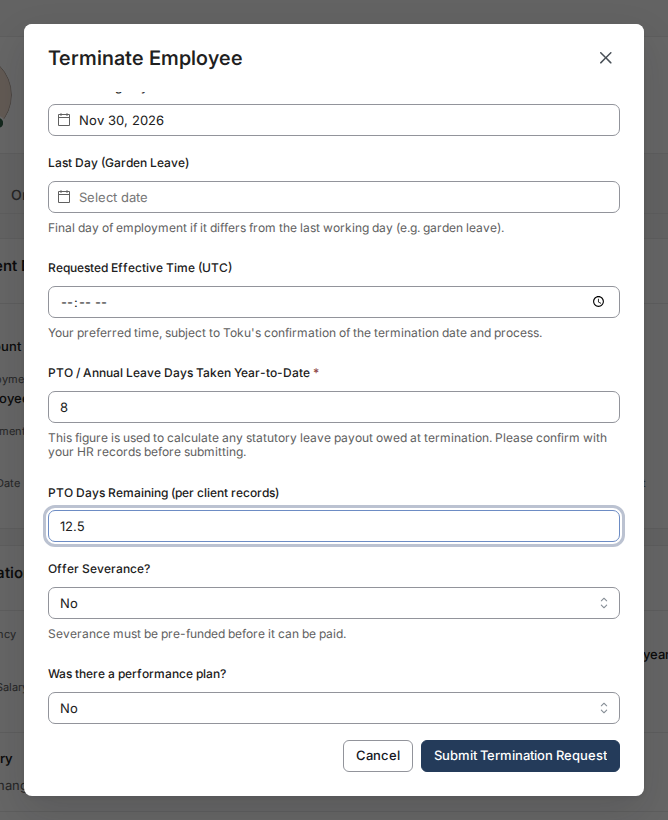
- Answer Was there a performance plan? honestly, as it matters for involuntary terminations. Review every field for accuracy, then click Submit Termination Request. If the last working day is within 30 days, a warning at the top of the form asks you to make sure your CS representative is aware and any prefunding is arranged; click the submit button again to confirm.
After you submit
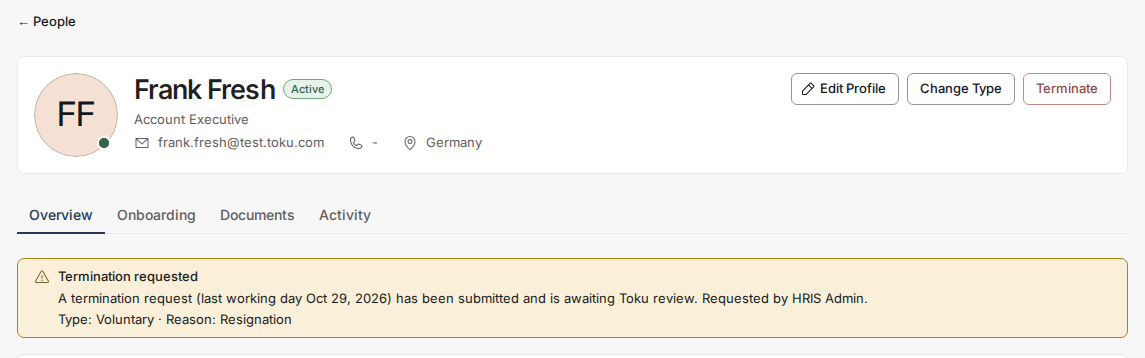
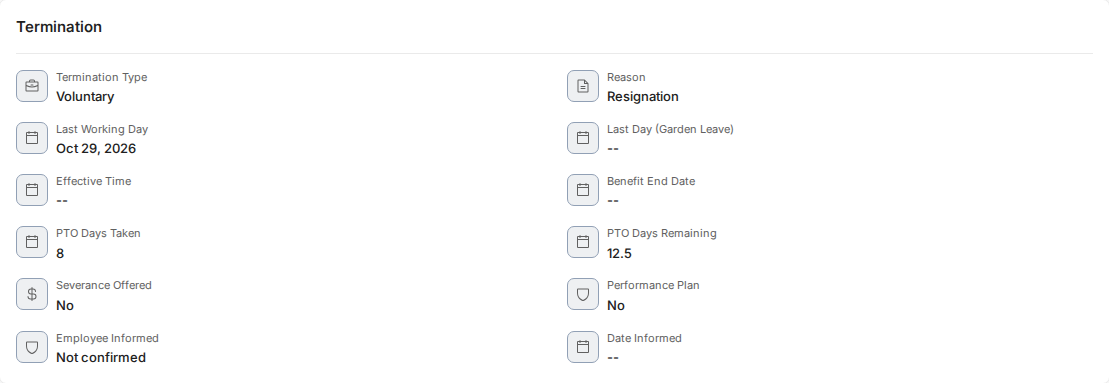
- The employee is not terminated until Toku approves the request and the approved date and time passes. While it is waiting, admins see a Termination requested banner with the last working day, requester, and reason. After approval, admins viewing the person's profile can see a Termination section with the type, reason, dates, PTO, severance, PILON, performance-plan details, whether and when the employee was informed, and Benefit End Date when set. The person's own profile does not receive those confidential termination details.
Good to know
- Minimum notice periods: Toku asks for at least 14 days' notice before an involuntary termination's last working day. A shorter date does not block the request - you tick the acknowledgement and the button changes to Submit for review. Toku may still need to move the last working day, the notice period or the final pay to meet local employment law, and extra costs may apply.
- Garden leave: If the person stops working but stays employed for a while, put their actual last working day in Last Working Day and their final day of employment in Last Day (Garden Leave).
- Exact timing: The optional Requested Effective Time (UTC) field records your preferred time on the last working day; Toku confirms the final date and time during review.
- Employee notification answer: Your answer and the date you enter are saved with the request for Toku's review. They do not send anything to the employee and do not start the notice period. Toku confirms the termination process and dates with you before any termination notice or document reaches the employee, whatever you answered.
- Final pay timing: If a yellow warning appeared under your date, final pay may land in the following month's payroll. Confirm this with your Toku representative.
- Benefit End Date: During review, Toku can set this optional date when benefit coverage ends on a different date. If left blank, coverage ends on the employment termination date. For disputed dates, extra severance, or works-council or union requirements, add context for Toku rather than assuming the form covers it.
Still stuck?
You can email [email protected] to reach our support team. Please include your email address, organization name, and a description of what happened. Screenshots and videos are always welcome to speed up the troubleshooting process. Feel free to reach out any time for further assistance.