
 7 MIN READ
 UPDATED NOV 4, 2026
⚠️ Contractor invoice and payment deadlines: late action means late payment
- Contractors: submit invoices by the 19th of each month. A saved draft is not a submitted invoice.
- Admins: approve invoices by the 21st of each month. Submission alone does not authorize payment.
- Funding: Toku must receive cleared funds 4 - 5 business days before payout. Initiating a transfer or sending proof of payment does not meet the deadline.
- Standard monthly payout: the last day of the month, provided submission, approval, and funding deadlines are met. Late submission, approval, or funding will delay payment. Every day of delay pushes payment back by at least one day. A missed payment cycle can cause a longer delay; the invoice due date is not a guarantee of payment.
Automation does not remove these deadlines. Earlier published holiday deadlines take precedence; see Toku: 2026 End-of-Year Payroll & Payment Guide.
Onboarding a new employee or contractor through Toku is simple. Once you've shared the basics, like your new hire's details and start date, we'll take it from there, guiding them through everything they need to complete. Most onboardings wrap up in just a few steps, and our team is here to support you (and your employee) every step of the way.
Best Practice: Onboard at least 2 weeks before the start date
To set your new contributor up for success, we ask that you initiate onboarding at least two weeks before their expected start date [See exact timeline guidance here]. This gives everyone enough time to complete all the necessary steps, including:
- Registering in the contributor's country of employment
- Completing required tax forms
- Enrolling in benefits
- Signing their employment contract Some countries also have compliance requirements that mean we legally need this information in advance - so the earlier, the better!
What happens if onboarding isn't completed in time?
If a contributor doesn't provide the required information before their start date, their start date may be delayed. To help keep things on track, we automatically send contributors email reminders to complete their onboarding and sign any outstanding documentation. You can also monitor progress and send reminders directly from the Onboarding Tracker in your Toku account.
Onboarding Instructions:
- Login to https://app.toku.com
- Open People in the left-hand menu.
- Click Add People in the top-right corner.
- In Add Team Member, select Contractor to add one contractor, or choose the appropriate employee type.
- For a contractor, click Continue and choose the engagement model. Bulk Import is a separate option for adding multiple people from a spreadsheet.
Required Fields for Bulk Upload
-
First Name
-
Last Name
-
Email (must be in valid email format)
-
Country of Residence (must match our list of supported countries)
-
Job Title
-
Job Description
-
Expected Start Date (format: YYYY-MM-DD)
-
Employment Type (must be one of: EOR, PEO, Payroll, or Contractor)
-
Annual Salary Amount (required for non-contractors; contractors can use Hourly Rate instead)
-
Salary Currency (e.g. USD, GBP, CAD, INR, etc.)
-
Equity Grant (must be Yes or No)
-
Token Grant (must be Yes or No) Optional Fields:
-
Middle Name
-
Department
-
Contract End Date (format: YYYY-MM-DD)
-
Hourly Rate (only for Contractors if Annual Salary Amount is not provided)
-
Sign-on Bonus Amount (must be a valid number)
-
Sign-on Bonus Currency (required if Bonus Amount is provided)
- Choose the employment or contractor engagement type that matches your agreement.
EOR Employee
EOR Employee: full time employment contract with local WorkCo entity. Follows local labor law and local payroll process. They are employed with Toku, but managed by the customer/client.
$599 per person per month
PEO Employee
PEO Employee: Professional Employer Organization (PEO) under a co-employment model, legally employed by both the PEO and the client company under a co-employment agreement. The PEO employment model is applicable in the US only and requires a specific PEO service agreement.
$89 per person per month
Payroll Employee
Payroll Employee: Toku processes only payroll for contributor. Employment of contributor is with client entity.
Pricing determined per client
Contractor
Contractor: contributor signs a consulting agreement with the WorkCo US entity and operates as an independent contractor, either as individual or via their own entity.
$149 per person per month
Contractor (Client-Managed)
Contractor (Client-Managed): Toku processes contractor payments only, whereby the contractor is under contract with client entity
$19 per person per month
- Enter in the details for the individual. You will be prompted to provide the following::
- First name
- Last name
- Country of residence
- An email address
- Salary amount
- Currency
- Start Date
- End Date (Contractors on fixed term contracts)
- Job Description
- Job title
- Employment type
Choose invoice automation before review
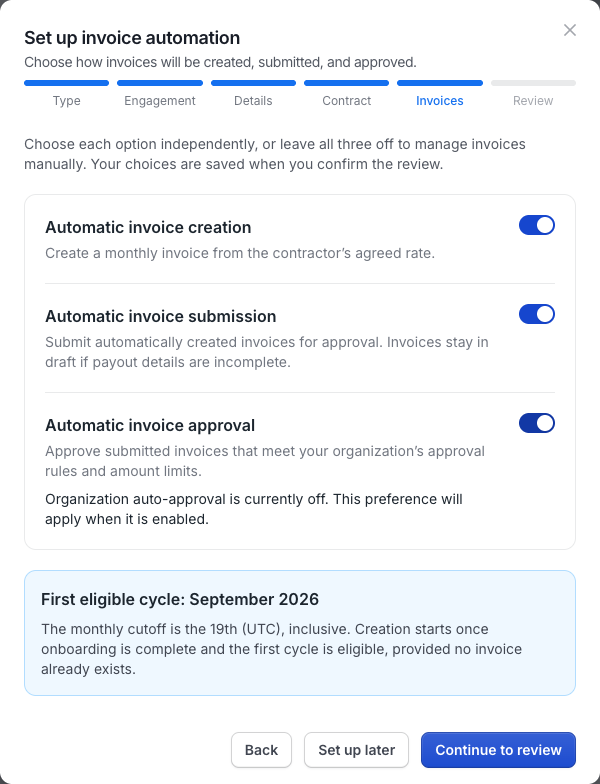
When adding a contractor through People → Add People, complete Contract, then choose invoice preferences on Invoices before Review. This step appears for Client Managed and Agent of Record contractors; available options depend on the contract and your organization’s settings.
- In Set up invoice automation, choose Automatic invoice creation, Automatic invoice submission, and Automatic invoice approval independently.
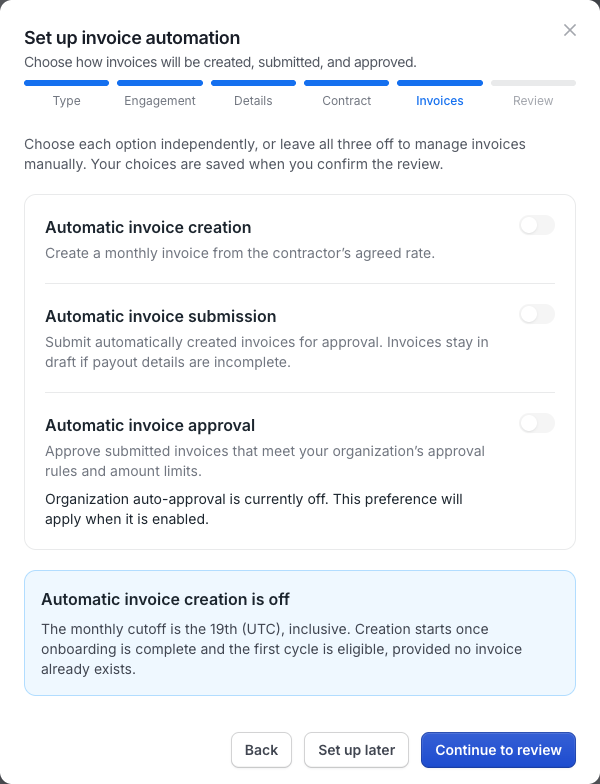
- Click Continue to review to keep your choices, or Set up later to defer configuration and preserve your organization’s defaults. Leaving all three choices off and continuing explicitly saves manual preferences.
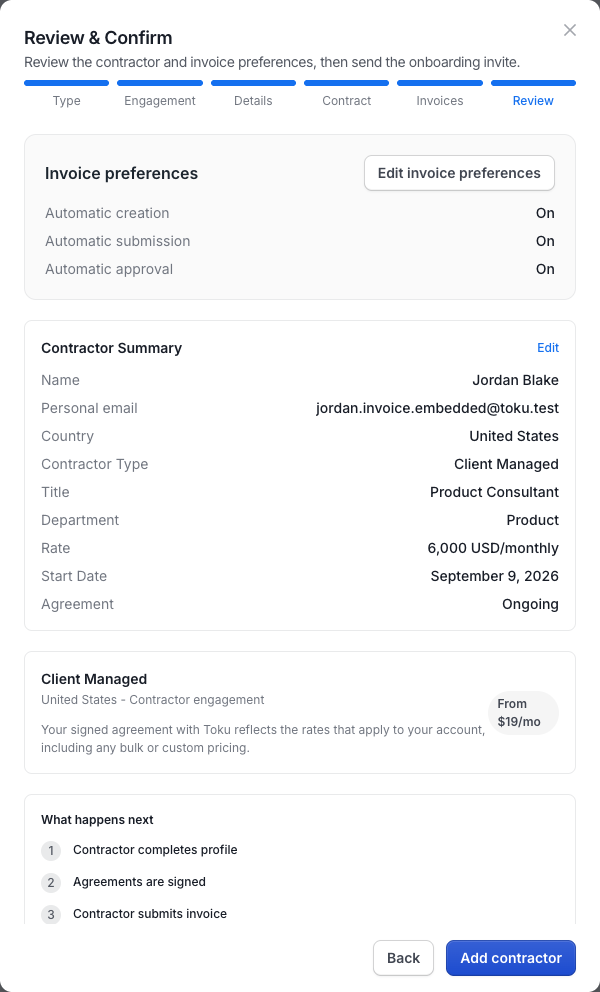
- On Review & Confirm, check Invoice preferences and click Add contractor to save. Use Edit invoice preferences or Back to revisit earlier steps without losing your entries.
Automatic creation waits until onboarding is complete and the first cycle is eligible; the monthly cutoff is the 19th (UTC), inclusive. Hourly invoices need hours entered manually, submission waits for complete payout details, and automatic approval still follows your organization’s rules and amount limits.
See the illustrated contractor onboarding walkthrough.
- For a contractor, click Add contractor on Review & Confirm to save their details and invoice preferences. For employees and bulk imports, follow the confirmation and invitation guidance shown in that flow.
- You can check the status of your team's onboarding on the Onboarding page in the left-hand menu. Each row shows the contributor's status (In progress, Awaiting verification, On hold or Completed), their progress and a short line saying who needs to act next. Until a contributor has submitted their details, use Resend onboarding invite (the paper-airplane icon) to send them the invitation email again. If they were never invited, the same icon reads Send onboarding invite. Once a contributor has submitted or finished onboarding, the icon no longer appears.
Fixed-term Contractors
You can notate a fixed-term contractor during onboarding by entering a Contract End Date.
If an End Date is entered during onboarding, you will get a warning 30 days before the End Date in your Toku dashboard alerting you to take action.
You can extend their contract by adjusting the End Date (can be done by clicking on people > then the individual's name > and editing their employment details). Otherwise, you will need to terminate the individual in Toku on or before their termination date. Please always ensure their final invoice is accurate.
CONFIDENTIALITY NOTICE: resource and any attachments are only for the use of the intended recipient and may contain information that is privileged, confidential or exempt from disclosure under applicable law. If you are not the intended recipient, any disclosure, distribution or other use of these resources or attachments is prohibited. If you have received this resource in error, please delete and notify the sender immediately. Thank you.