
 6 MIN READ
 UPDATED OCT 30, 2026
Om din anställning kräver tidsregistrering skickar du in en månatlig arbetstidsjournal till Toku så att vi kan dokumentera din arbetstid korrekt och behandla dina timmar via lönekörningen. / If your employment requires time tracking, you'll submit a monthly working time record to Toku so we can document your hours accurately and process them through payroll.
💡 Arbetstidsjournal / Working Time Record
Hämta mallen här / Access the template here: View Working Time Record Template →
Detta är en skrivskyddad fil. Gör en egen kopia innan du börjar fylla i den. / This is a view-only file. You must make your own copy before filling it out.
Steg 1: Gör din egen kopia / Step 1: Make Your Own Copy
- Öppna länken ovan. / Open the link above.
- Gå till Arkiv → Skapa en kopia i Google Kalkylark. / Go to File → Make a copy in Google Sheets.
- Döp om din kopia enligt formatet: [Ditt fullständiga namn] - Arbetstidsjournal 2026
- Exempel / Example: Anna Lindqvist - Arbetstidsjournal 2026
- Spara den i din egen Google Drive. Din kopia är privat som standard. / Save it to your own Google Drive. Your copy is private to you by default.
⚠️ Redigera inte originalmallen direkt. Ändringar du gör i originalfilen syns för alla. / Do not edit the master template directly. Any changes you make to the original file will be visible to everyone.
Steg 2: Fyll i din journal / Step 2: Fill Out Your Record
- Välj rätt månadsflik längst ner i arket (t.ex. Juni, Juli). / Select the correct month tab at the bottom of the sheet (e.g. June, July).
- Ange ditt namn i fältet överst på fliken. / Enter your name in the field at the top of the tab.
- Uppdatera din dagliga status för varje arbetsdag med hjälp av rullgardinsmenyn i kolumnen Kod: / Update your daily status for each working day using the dropdown in the Code column:
| Kod / Code | När den används / When to use it |
|---|---|
| N | Närvarande, ange start- och sluttid / Present, enter your start and end time |
| SEM | Semester / Annual leave |
| SJUK | Sjukfrånvaro (dag 1 är karensavdrag) / Sick leave (day 1 is the karensdag deduction) |
| VAB | Vård av sjukt barn / Care of a sick child |
| FÖR | Föräldraledighet / Parental leave |
| PAPPA | Pappaledighet / Paternity leave |
| HELG | Helgdag, förifyllt åt dig / Public holiday, already pre-filled for you |
| TJL | Tjänstledighet (obetald) / Unpaid leave of absence |
- På en dag du arbetat (N): ange start- och sluttid; din ordinarie arbetstid beräknas automatiskt. / On a day you worked (N): enter your start and end time; your ordinary hours calculate automatically.
- Ange även separat, om tillämpligt: / Also separately record, if applicable:
- Övertid / Overtime: timmar utanför din ordinarie dagliga/veckovisa arbetstid / hours beyond your normal daily/weekly hours
- Mertid / Additional hours: för deltidsanställda som arbetar utanför sitt kontrakterade schema men inom heltidsnormen / for part-time employees working beyond their contracted schedule but within the full-time norm
- Jour/Beredskap / On-call: tid du var tillgänglig men inte aktivt arbetade / time you were available but not actively working Lämna dessa tomma om de inte gäller den dagen. / Leave these blank if they don't apply that day.
- Granska kolumnen Totalt arbetad: den beräknas automatiskt utifrån de timmar du angett. / Review the Total worked column: it calculates automatically from the hours you've entered.
Steg 3: Underteckna och skicka in / Step 3: Sign and Submit
- Längst ner på månadsfliken, fyll i avsnittet Godkännande: ditt fullständiga namn, underskrift och datum. / At the bottom of the month tab, complete the Approval section: your full name, signature, and date.
- Klicka på den månadsflik du skickar in. / Click the month tab you're submitting.
- Gå till Arkiv → Ladda ner → Kommaseparerade värden (.csv). / Go to File → Download → Comma-separated values (.csv).
- Detta exporterar bara den aktiva fliken, så se till att du är på rätt månad innan du laddar ner. / This exports only the active tab, so make sure you're on the right month before downloading.
- Logga in på din Toku HRIS-profil. / Log in to your Toku HRIS profile.
- Gå till Dokument i vänstermenyn. / Navigate to Documents in the left-hand menu.
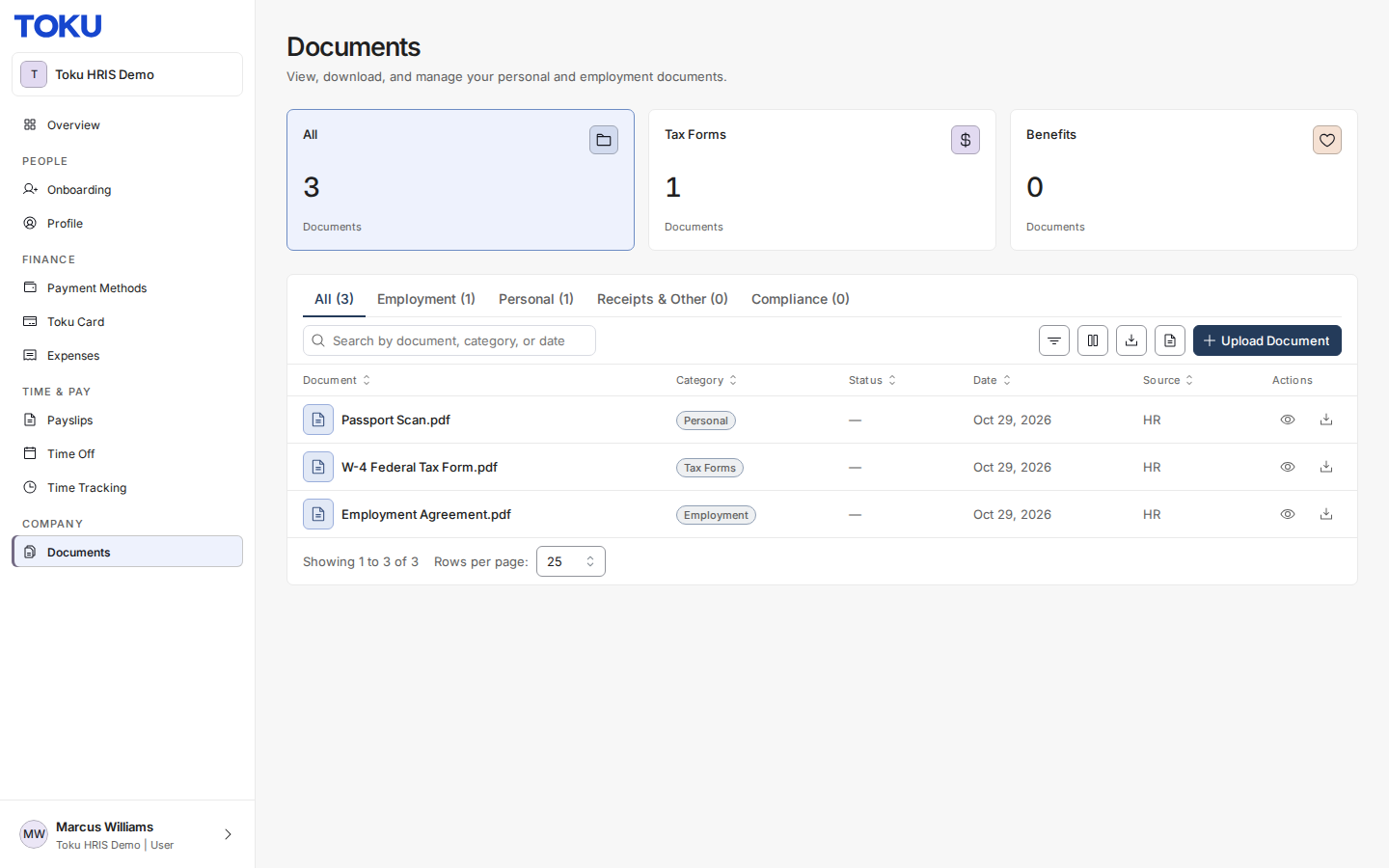
- Klicka på Ladda upp dokument och ladda upp CSV-filen. / Click Upload Document and upload the CSV file.
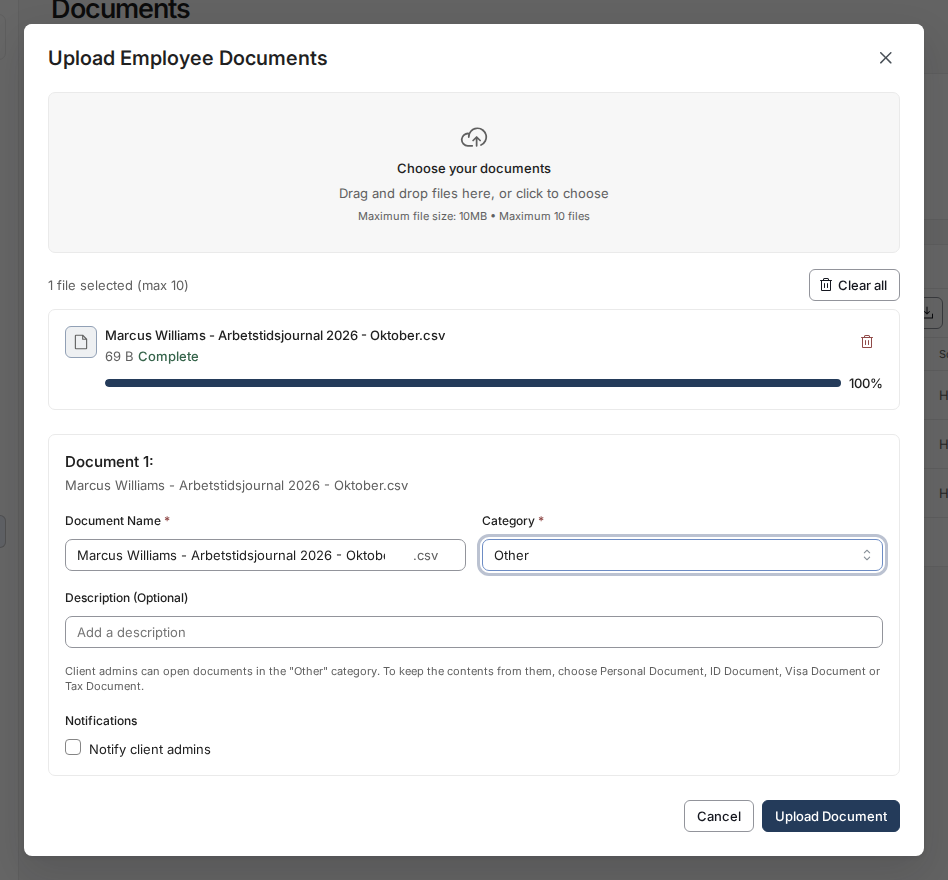
Toku meddelas automatiskt och behandlar dina timmar inför kommande lönekörning. / Toku will be automatically notified and will process your hours for the upcoming payroll run.
⏰ Inlämningsdatum / Submission Deadline
Lön betalas ut den 25:e varje månad. Skicka in din arbetstidsjournal senast den 14:e i månaden så att den hinner behandlas i den månadens lönekörning. / Salaries are paid on the 25th of each month. Submit your working time record by the 14th of the month so it can be processed in that month's payroll run.
Om din journal skickas in sent, eller om du har korrigeringar till redan inskickade timmar, kommer Toku att behandla dina ordinarie kontrakterade timmar för den aktuella perioden och rätta eventuell skillnad på följande månads lön. / If your record is submitted late, or you have corrections to hours already submitted, Toku will process your standard contracted hours for the current cycle and correct any difference on the following month's payroll.
Varför krävs detta? / Why is this required?
Svensk lag (Arbetstidslagen, 1982:673) kräver att arbetsgivare dokumenterar övertid, jour/beredskap och mertid för varje anställd, sparat i minst 3 år. Toku registrerar även ordinarie arbetstid som bästa praxis, med tanke på EU:s arbetstidsdirektiv. Detta är ett lagstadgat dokumentationskrav, inte en Toku-specifik policy. / Swedish law (the Working Hours Act, 1982:673) requires employers to document overtime, on-call time, and additional hours for every employee, retained for at least 3 years. Toku also records ordinary hours as best practice, given the EU Working Time Directive. This is a statutory record-keeping requirement, not a Toku-specific policy.
Frågor? / Questions?
Kontakta din Toku Customer Success Manager eller maila [email protected]. / Contact your Toku Customer Success Manager or reach out to [email protected].