
 3 MIN READ
 UPDATED MAY 12, 2026
Processing Token Payouts in Justworks
How to record a token-funded bonus without sending a net cash payment through payroll
When a recipient is paid in tokens outside of Justworks, payroll still needs to capture the related wages and tax withholding. Because Justworks does not back into a gross amount from a net pay check bonus, the process is completed in two payrolls: first to estimate withholding, and second to record the final payment correctly.
Why this is a two‑payroll process
- Run a gross bonus payroll by direct deposit so Justworks can calculate withholding.
- Cancel that payroll before it processes so no cash is disbursed.
- Re-enter the payment as a net pay check so wages and withholding are recorded, while the employee receives the value in tokens outside of Justworks.
1) Step 1 - Run a gross bonus payroll to calculate withholding
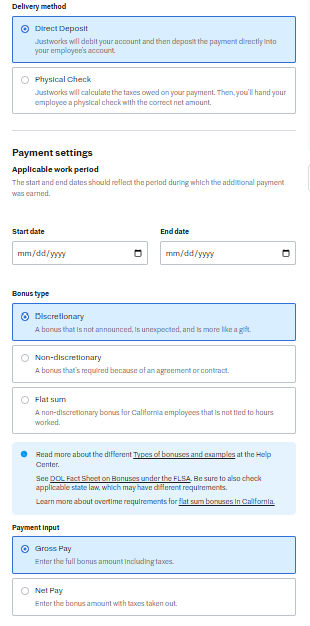
- Select Direct Deposit as the delivery method.
- Choose the appropriate Bonus type (most commonly Discretionary, unless a different type applies).
- Under Payment input, select Gross Pay.
- Enter the applicable work period dates.
- Enter the gross bonus amount and review the payroll preview.
- Capture the tax and withholding amounts shown by Justworks for each recipient.
Screenshot: Gross bonus setup (Direct Deposit + Gross Pay)
2) Step 2 - Cancel the first payroll before processing
- After reviewing the calculated withholding, cancel the payroll before funds are processed.
- Keep the withholding results from this first run, as they will guide the final payroll entry.
Key point The first payroll is used only to calculate withholding. It should not be allowed to process.
3) Step 3 - Re-enter the payment as a net pay check
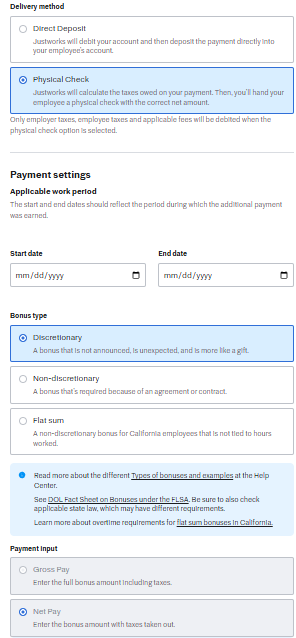
- Select Physical Check as the delivery method.
- Choose the same Bonus type used in the first payroll (usually Discretionary).
- Under Payment input, select Net Pay.
- Enter the net amount the recipient should receive in tokens (the token payout is delivered outside of Justworks).
- Confirm benefit deductions are not applied (see below).
- Review the payroll preview and confirm withholding aligns with the calculation from Step 1.
Screenshot: Net pay check setup (Physical Check + Net Pay)
Supplemental wage withholding (federal)
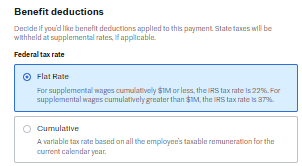
Bonuses are generally treated as supplemental wages for withholding purposes. A common federal supplemental withholding approach is:
- 22% on supplemental wages cumulatively $1,000,000 or less
- 37% on supplemental wages cumulatively greater than $1,000,000 State and local withholding may also apply. The withholding calculated by Justworks should be treated as the source of truth for the payroll run.
Screenshot: Federal tax rate option (Supplemental / Flat rate)
Benefit deductions
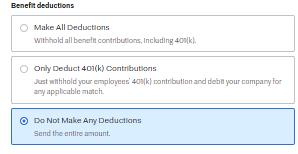
For token payouts, benefit deductions typically should not be applied to the payment. Select Do Not Make Any Deductions so the net amount reflects the intended token value.
Screenshot: Benefit deductions (Do Not Make Any Deductions)
Final review checklist
- [ ] Payroll 1 (gross / direct deposit) was canceled before processing
- [ ] Payroll 2 delivery method is Physical Check
- [ ] Payroll 2 payment input is Net Pay
- [ ] Net amount matches the intended token value delivered outside of Justworks
- [ ] Benefit deductions are set to Do Not Make Any Deductions
- [ ] Payroll preview reflects expected tax withholding
- [ ] No net cash payment will be sent to the employee through Justworks