
 5 MIN READ
 UPDATED OCT 30, 2026
📘 For approvers on Toku. Last updated October 30, 2026.
If an administrator has made you an approver, you review time off and expense requests for the people who report to you - from inside the same Toku app you already use as an employee. This article covers your dashboard, how to action a request, and the few things approvers deliberately can't do.
Before you start
- An administrator has to grant you the Approver role and set up who reports to you. Until both are done, you won't see any team requests.
- When you sign in, your account at the bottom of the sidebar is labelled Approver. You keep the full employee app - Overview, Time Off, Expenses, Payslips, Documents, Profile - and can submit your own requests as normal.
Your dashboard
On Overview, two widgets sit below your personal pay and time off cards:
- Needs your review counts the time off requests and expense reports waiting on you, and links straight to each queue. When there's nothing pending it simply says you're all caught up.
- Your team lists your direct reports, how many people are in your team overall, and, when anyone is away, who is out today or upcoming this week, with the leave type.
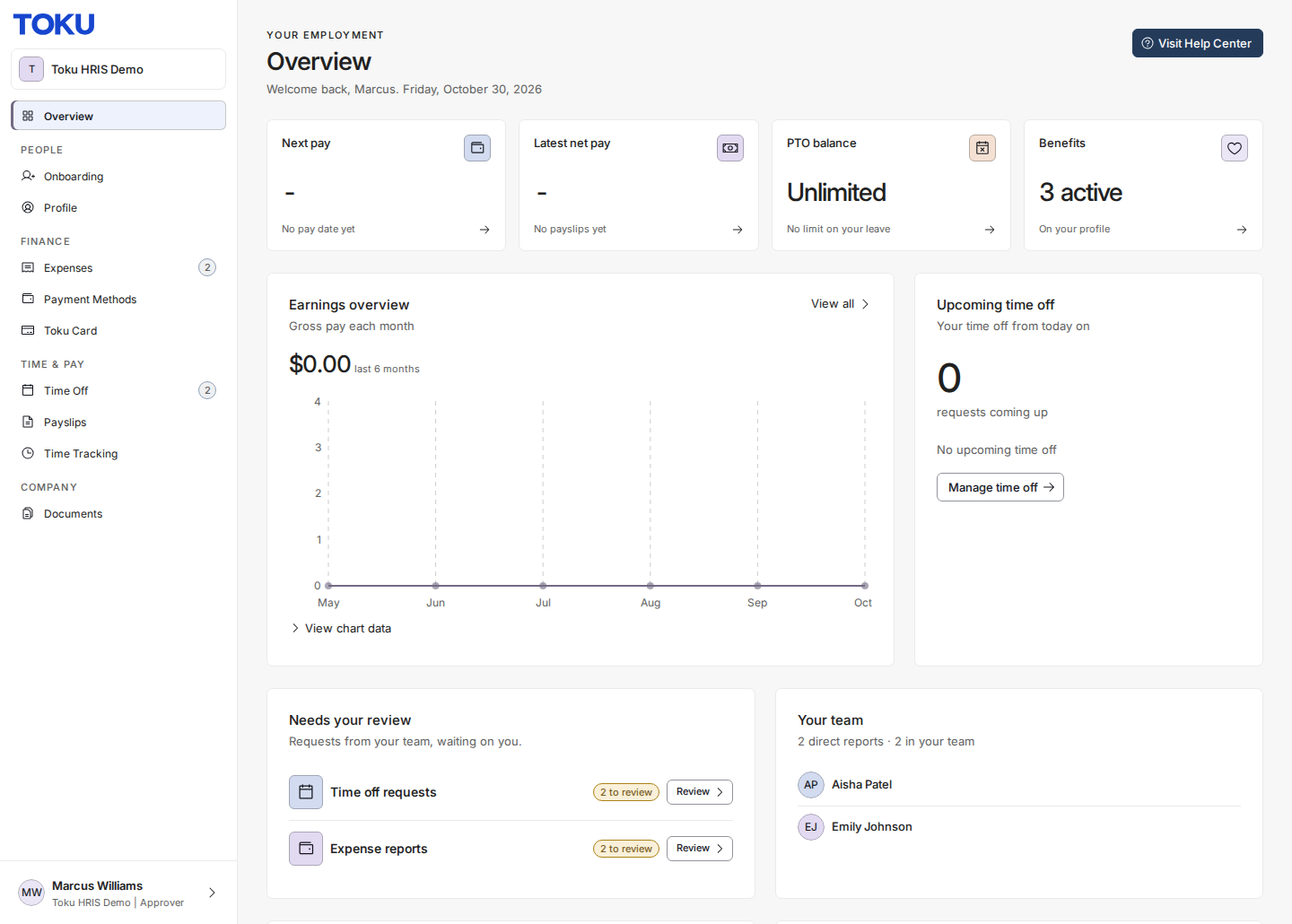
Your own pending requests are never counted in "Needs your review" - those are someone else's to decide.
Review a time off request
- Open Time Off. There are two tabs: My time off (your own requests, exactly as any employee sees them) and Team requests, with a badge showing how many are pending.
- On Team requests, each row shows the person, leave type, dates, and their remaining balance, so you can decide in context. Rows you can act on show a tick and a cross in the Actions column; the eye icon opens the request without deciding anything.
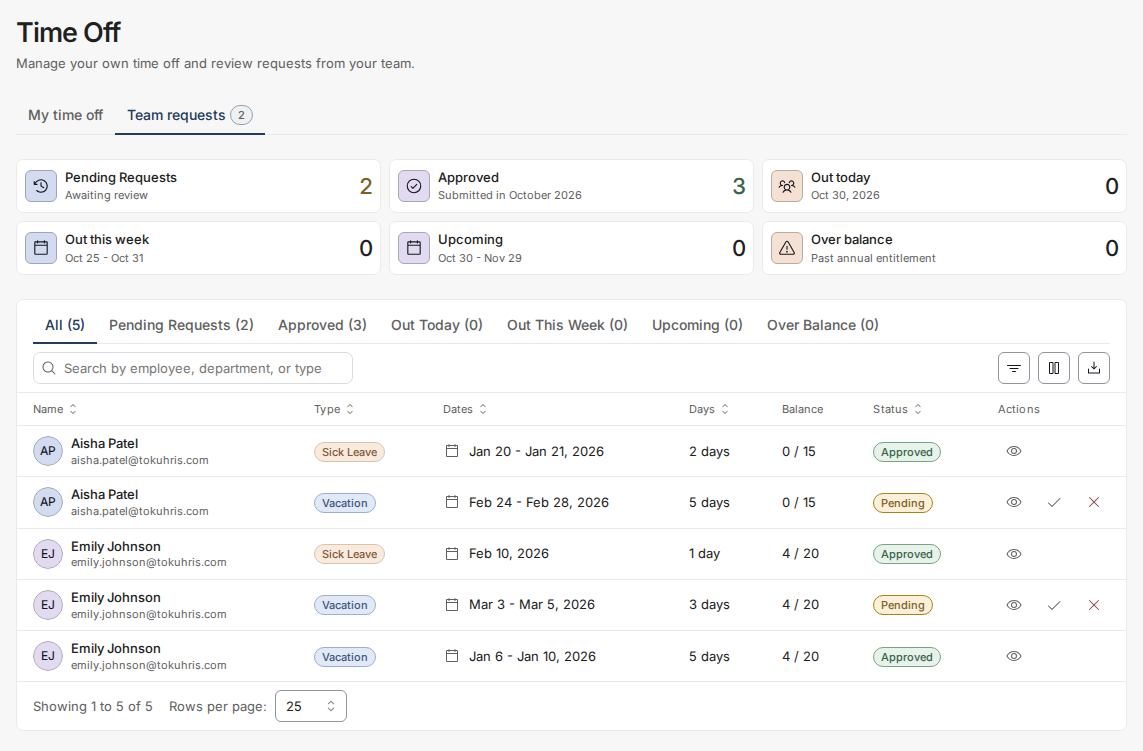
- Select the tick to approve, or the cross to reject - rejections ask for a reason, which the employee receives. Once actioned, the row's status flips, its approve and reject controls disappear, and the pending count drops. That vanished pair of controls is your confirmation the decision took.
Review an expense report
- Open Expenses. Again two tabs: My expenses (create, edit, and submit your own reports, receipts and all) and Team approvals.
- Reports below your organization's auto-approve threshold are approved automatically and never reach you. Anything above it waits in Team approvals.
- Open the report you want to review. The detail view shows each line item with its category, amount, and receipt, plus the submitter's justification, with Reject and Approve at the bottom.
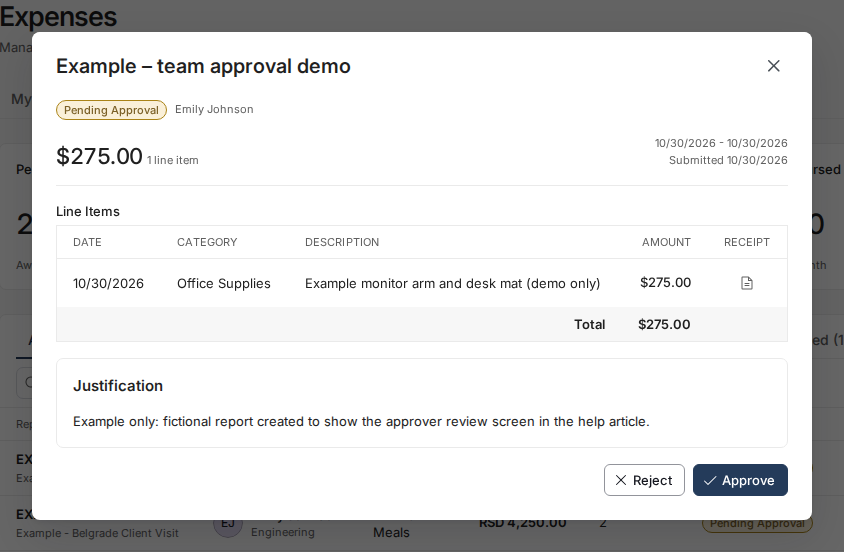
Toku confirms with Expense report approved, and the report moves out of the pending count. There is no Mark Paid for approvers - approving clears the report for payment, and an administrator pays it out.
What approvers deliberately can't do
- Approve their own requests. Your requests live only under My time off and My expenses — they never appear in your team tabs, and no approve or reject controls are ever drawn on them, even for a moment while a page loads. Another approver above you, or an administrator, actions them.
- Reach admin areas. Pages like Team & Permissions and Reports show Access Denied (People takes you back to your Overview) - being an approver grants review tabs, not administration. If you need more, ask your administrator about an admin role.
- Pay expenses or change expense policy. Thresholds, categories, and payout are administrator territory.
If something doesn't work
- Your team tabs are empty. Either nothing is pending, or nobody is set up to report to you yet - your administrator can check in Team & Permissions.
- Someone's request never reached you. They may have no manager set on their profile, or report into a different branch. Ask your administrator to check.
- You get an Access Denied page. Expected anywhere outside the employee app and your review tabs.
- An old bookmark opens somewhere new. Links to the old review page now land on Time Off → Team requests — that's the same queue in its new home.
Good to know
- Your scope follows the reporting lines, so it updates by itself when your administrator moves people - a whole sub-team can appear in your queues after a single profile change.
- The eye icon is always safe: it opens a request or report without deciding anything.
- Notification emails arrive with the subject "You have 1 pending notification on Toku" — see Toku: Choose who gets notified about time off and expense approvals.
- For how administrators set all this up, see Toku: Set up reporting lines and grant time off and expense approval.
Still stuck?
You can email [email protected] to reach our support team. Please include your email address, organization name, and a description of what happened. Screenshots and videos are always welcome to speed up the troubleshooting process. Feel free to reach out any time for further assistance.