
 2 MIN READ
 UPDATED OCT 30, 2026
📘 For primary organization administrators on Toku. Last updated October 30, 2026.
As a primary administrator, you can reveal your organization's full funding bank account details in the Company section.
Before you start
- You must be the primary administrator (the earliest-created active admin in your organization).
- Navigate to Company in the left-hand menu.
- Locate the Funding Method card on the page.
View your full bank details
- Open Company in the left-hand menu. The page displays your Funding Method card, which shows your bank name and a masked account number (e.g., ····6789).
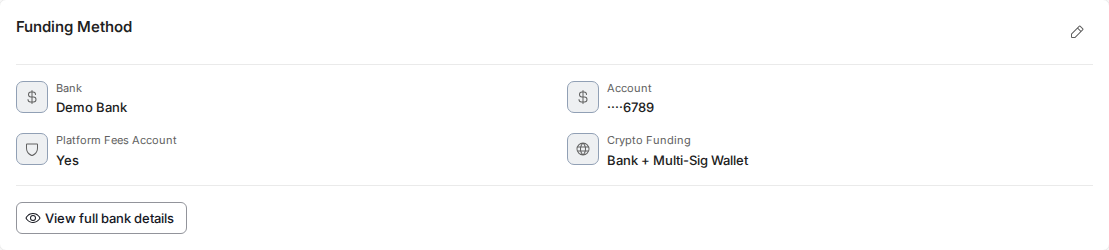
- Click the View full bank details button. Your full account number, routing number and account type are now displayed.
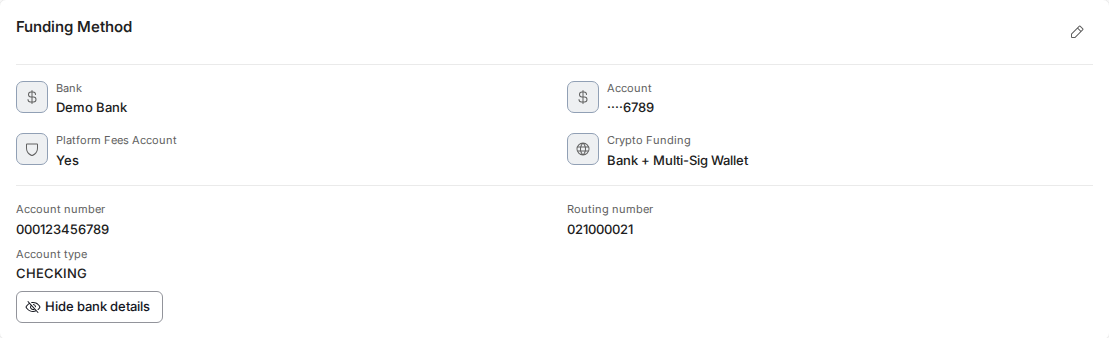
- To hide the details again, click Hide bank details. The card returns to the masked view shown in step 1 (bank name plus ····6789), with the View full bank details button back in place.
Good to know
- Only the primary administrator can access and reveal full bank details; other administrators will not see the reveal button.
- All reveals are logged for audit purposes - Toku records which administrator viewed the account details and when.
⚠️ This feature is restricted to the primary administrator of your organization. If you are not the primary administrator, you will see the masked account number only and will not have access to view full details.
Watch it in action
Watch the primary administrator navigate to the Company page and reveal the full bank account details.
Walkthrough: login → Company → Funding Method → reveal full details.
Quick preview of revealing bank details.
Still stuck?
You can email [email protected] to reach our support team. Please include your email address, organization name, and a description of what happened. Screenshots and videos are always welcome to speed up the troubleshooting process. Feel free to reach out any time for further assistance.