
 6 MIN READ
 UPDATED OCT 30, 2026
How your organization connects its Squads multisig (Solana) to Toku so crypto payment batches can be proposed straight to your vault - while your own multisig members keep full control of the funds. Setup takes about 10 minutes.
What this integration does
Connecting Squads lets Toku prepare Solana payment proposals on your organization's own Squads multisig. Key properties of the design:
- Toku only initiates - it never approves or executes. Toku's signer is added to your multisig with the Initiator permission (called Proposer in the Squads app): it can create payment proposals, but every payout still needs your members to approve it per your threshold and execute it in Squads.
- Your funds never leave your custody. Payouts are paid from your Squads vault, and only your members can move them. You can remove Toku's member from the multisig at any time.
- One signer per organization. Toku generates a dedicated signer keypair for your org and stores its private key encrypted - you only ever handle the public address.
- Verified before it goes live. Toku reads your multisig on-chain and confirms its signer is a member with the required permission before payments are enabled.
Before you start
| Requirement | Details |
|---|---|
| Toku access | A user with the Client Org Admin or Finance Admin role. If nobody on your team has one, ask your Toku contact. |
| Squads access | A multisig member who can initiate an Add Member change - and enough members available to approve it per your threshold. |
| A funded vault | The Squads vault that pays payouts should hold the payout tokens plus a small SOL balance. |
| Solana enabled in Toku | The Solana network and your payout token must be enabled for your organization - ask your Toku contact if unsure. |
Where to find it in Toku: open Admin Integrations → Payment Integrations → Squads card. The card opens the setup wizard used throughout this guide.
💡 If someone else manages your multisig, the wizard can email them the Squads-side instructions - you don't have to be the multisig member yourself.
Step 1 - Connect your multisig
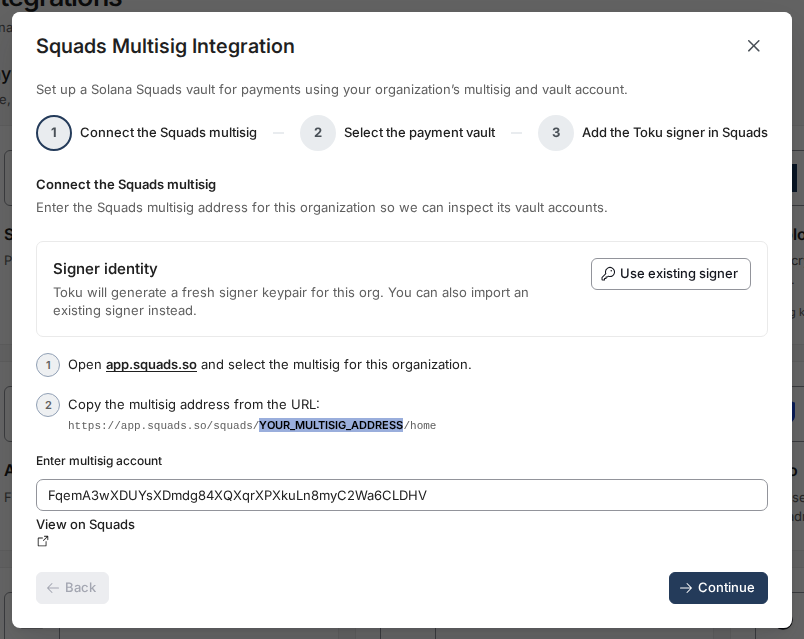
1a. Copy the multisig address from Squads
Open https://app.squads.so, select the multisig for your organization, and copy the address straight from the browser URL:
https://app.squads.so/squads/YOUR_MULTISIG_ADDRESS/home

1b. Paste it into Toku
Paste the address into Enter multisig account and click Continue. Toku looks the account up on-chain and inspects its vault accounts - pasting exactly what's in the URL works, even on older Squads dashboard links.
The Signer identity box shows that Toku will generate a fresh signer keypair for your org automatically. (If your organization already has a signer key it wants Toku to use, Use existing signer lets you import one instead - most teams should stick with the generated key.)
Step 2 - Select the payment vault
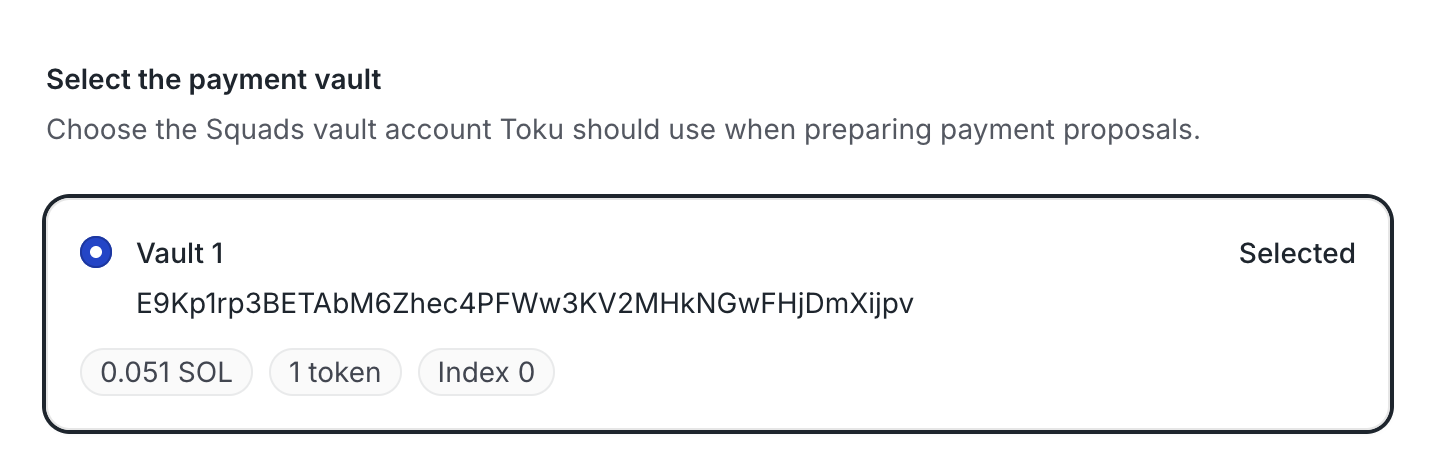
Choose the Squads vault account Toku should use when preparing payment proposals. Each option shows the vault's SOL balance, token count, and index - pick the one your team funds for payouts.
Step 3 - Add the Toku signer to your multisig (in Squads)
Toku now shows the signer address it generated for your organization. Copy it with the clipboard button.
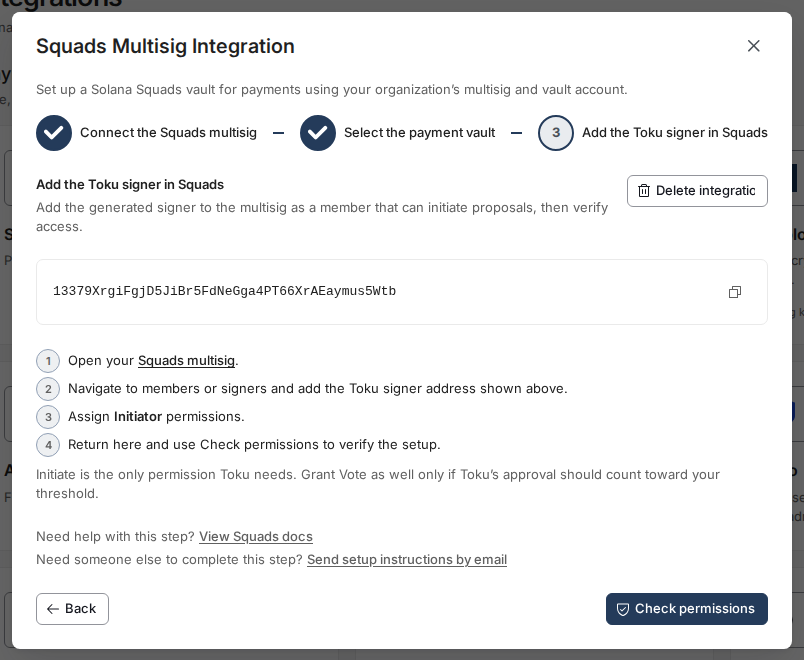
Then, in the Squads app:
- Open your multisig and go to the Members page (
https://app.squads.so/squads/…/members). - Click Add Member and paste the Toku signer address as the Public key.
- Under Permissions, tick Proposer — that's the Squads app's name for the Initiator permission Toku needs. Voter and Executor are not required; leaving them unchecked keeps Toku least-privileged. Leave the threshold unchanged.
- Click Initiate transaction.
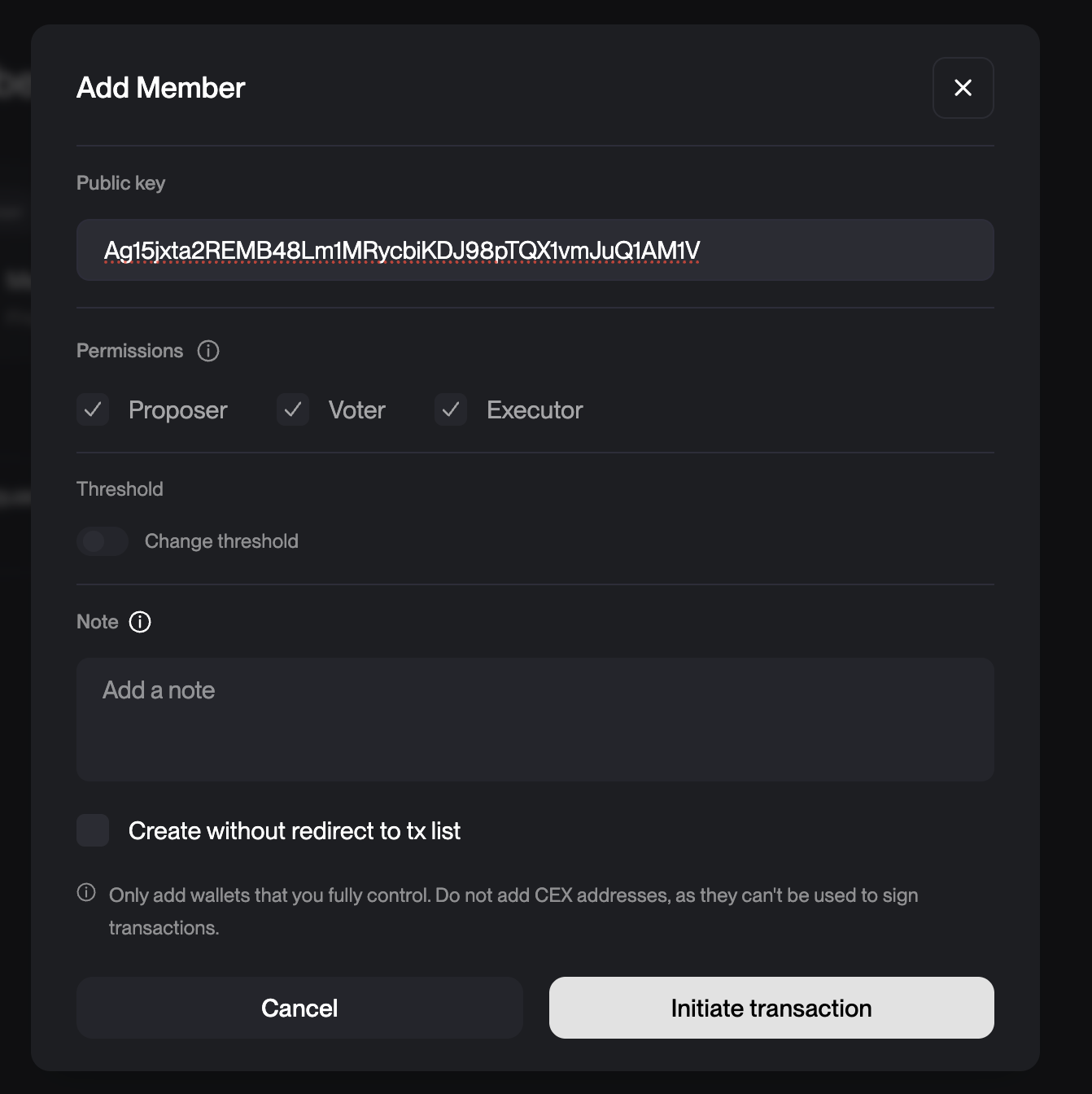
⚠️ Adding a member is itself a multisig transaction. Your existing members must approve it (per your threshold) and execute it in Squads before the Toku signer becomes active - the next step's check will fail until that transaction has executed.
Step 4 - Check permissions (back in Toku)
Return to the Toku wizard and click Check permissions. Toku reads the multisig on-chain and confirms its signer is a member with the Initiator permission.
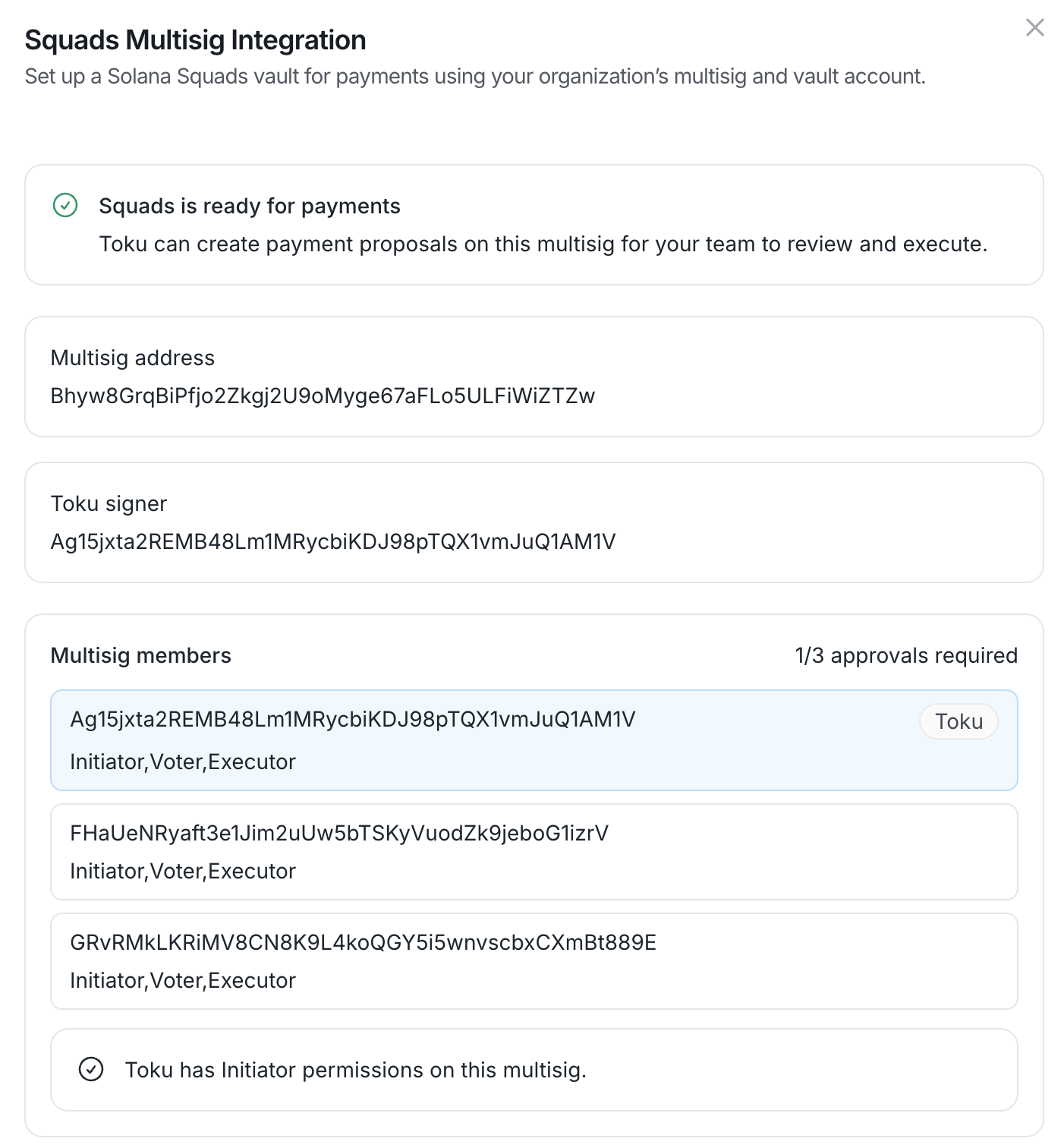
When the check passes, the integration shows “Squads is ready for payments” with your multisig address, the Toku signer, and the full member list with roles and the approval threshold:
Confirm it's live
- [ ] The integration shows “Squads is ready for payments” and “Toku has Initiator permissions on this multisig.”
- [ ] The Squads card under Payment Integrations shows Connected.
- [ ] The selected vault holds the payout token and some SOL.
- [ ] Run a small test payout: Toku proposes it, your members see it in the Squads transactions list, and after approval and execution it completes end-to-end.
How payouts work once connected
- When a payment batch is paid via Squads, Toku creates a payment proposal on your multisig, paying from the vault you selected - nothing moves yet.
- Your members see the proposal in the Squads app, review it, and approve it according to your threshold (e.g. 1/3, 2/3).
- Once approved, a member executes the transaction - the funds leave the vault and Toku records the payout as complete. Toku can never approve or execute a payout on its own - a proposal nobody approves simply stays pending in Squads.
Maintenance: revoking and re-connecting
| Action | How / effect |
|---|---|
| Revoke Toku's access | Remove the Toku signer from your multisig members in the Squads app. Toku can no longer create proposals from that moment. |
| Delete the integration in Toku | Removes the vault selection and signer setup on Toku's side. Payment batches can't be paid via Squads until it's reconnected. Also remove the Toku member in Squads if you're disconnecting for good. |
| Change the payment vault | Re-run the setup and pick a different vault - the multisig and signer stay the same. |
Troubleshooting
| Symptom | Likely cause → fix |
|---|---|
| Check permissions fails | The Add Member transaction hasn't been fully approved and executed in Squads yet - or the Proposer permission wasn't ticked. Fix it in Squads, then check again. |
| Toku can't find the multisig | The address wasn't copied from the Squads URL, or has a typo - copy the segment between /squads/ and /home exactly. |
| A payout has been pending for a while | The proposal is waiting in your Squads transactions list — members need to approve and execute it. |
| A payout fails on execution | Usually funding: the vault needs enough of the payout token and a small SOL balance for on-chain fees and token accounts. |
| The setup needs someone else's approval | Use the wizard's email option to send the Squads-side instructions to the person who manages your multisig. |
Questions or a step that doesn't match what you see? Contact your Toku account manager or support - we're happy to walk through the setup together.