
 2 MIN READ
 UPDATED OCT 30, 2026
⚠️ Contractor invoice and payment deadlines: late action means late payment
- Contractors: submit invoices by the 19th of each month. A saved draft is not a submitted invoice.
- Admins: approve invoices by the 21st of each month. Submission alone does not authorize payment.
- Funding: Toku must receive cleared funds 4 - 5 business days before payout. Initiating a transfer or sending proof of payment does not meet the deadline.
- Standard monthly payout: the last day of the month, provided submission, approval, and funding deadlines are met. Late submission, approval, or funding will delay payment. Every day of delay pushes payment back by at least one day. A missed payment cycle can cause a longer delay; the invoice due date is not a guarantee of payment.
Automation does not remove these deadlines. Earlier published holiday deadlines take precedence; see Toku: 2026 End-of-Year Payroll & Payment Guide.
📘 For non-US contractors on Toku. Last updated October 30, 2026.
Access your invoice history through the Invoices section. You are responsible for reporting income according to your local tax laws.
Before you start
- You'll need your Toku login to access your invoices.
- Keep copies of all invoices for your tax records.
Find Your Invoice History
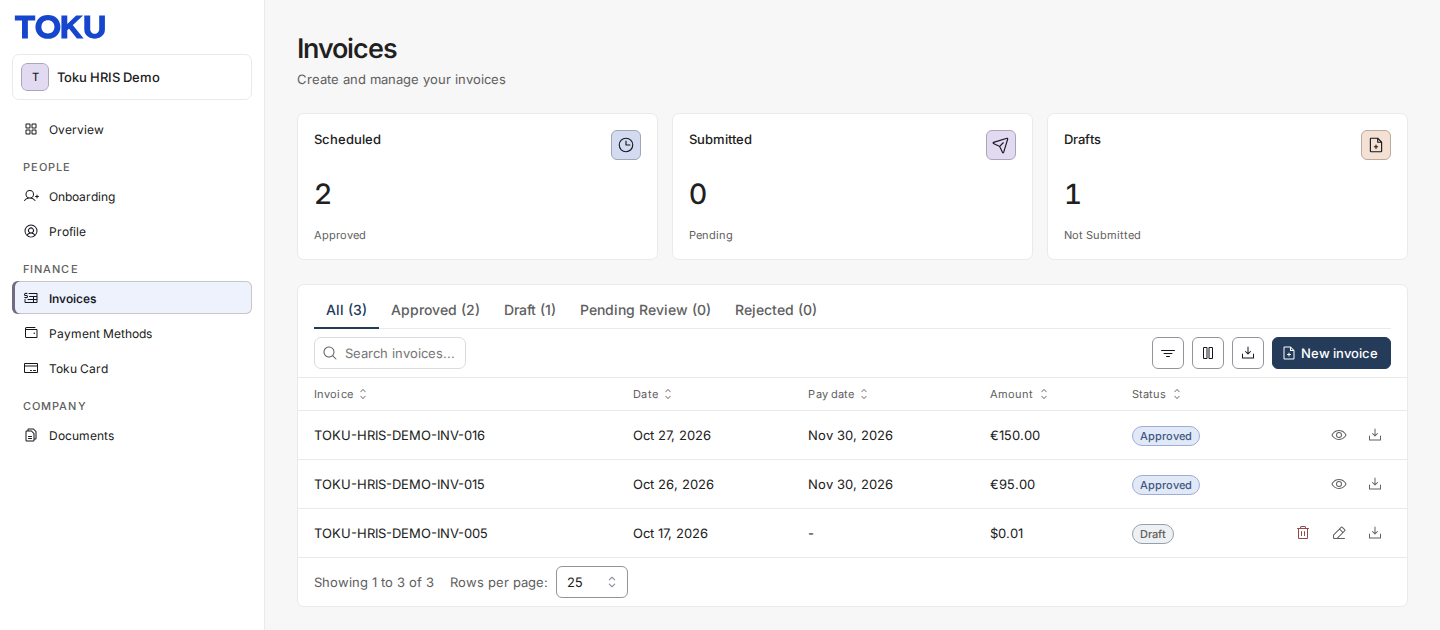
- Log in to your Toku dashboard. In the left-hand menu, under FINANCE, click Invoices.
- Your invoices appear in a table showing invoice details, amounts, and status. Download or review each invoice as needed for tax reporting.
Keep Records for Tax Compliance
As a non-US contractor, you are responsible for reporting all income to your local tax authority in accordance with your country's tax laws. Toku does not generate 1099 forms or other official tax documents for contractors outside the United States. Your invoice history serves as your record of payments received through Toku.
Good to know
- Export your invoices regularly and maintain copies for your records.
- Your invoice amounts may differ from payroll records if you negotiated term changes - the invoice amount is your official record.
- Contact your local tax advisor for guidance on how to report Toku income in your jurisdiction.
Still stuck?
You can email [email protected] to reach our support team. Please include your email address, organization name, and a description of what happened. Screenshots and videos are always welcome to speed up the troubleshooting process. Feel free to reach out any time for further assistance.